Smootify 2.0 is here, in public beta. It is the biggest change since Smootify started: the store stops living in apps and scripts around your site, and moves into the design you build in Webflow.
Booking, the Magic Box, the product configurator, the cookie banner, the pixels, the markets, the toasts: in 2.0 each one is an element or an attribute you place in the Designer, styled with your classes and moved by your interactions. Smootify fills them with Shopify, and you keep every pixel of the layout.
2.0 knows 110 elements and close to 600 attributes and conditions, each documented, checked by the debugger and known to the Smootify MCP. We rebuilt Smootify from the ground up, then built three complete stores on it to prove it on real catalogues: furniture made to measure, industrial parts sold to companies, and breakfast boxes with delivery windows. They are live, and you can clone them:
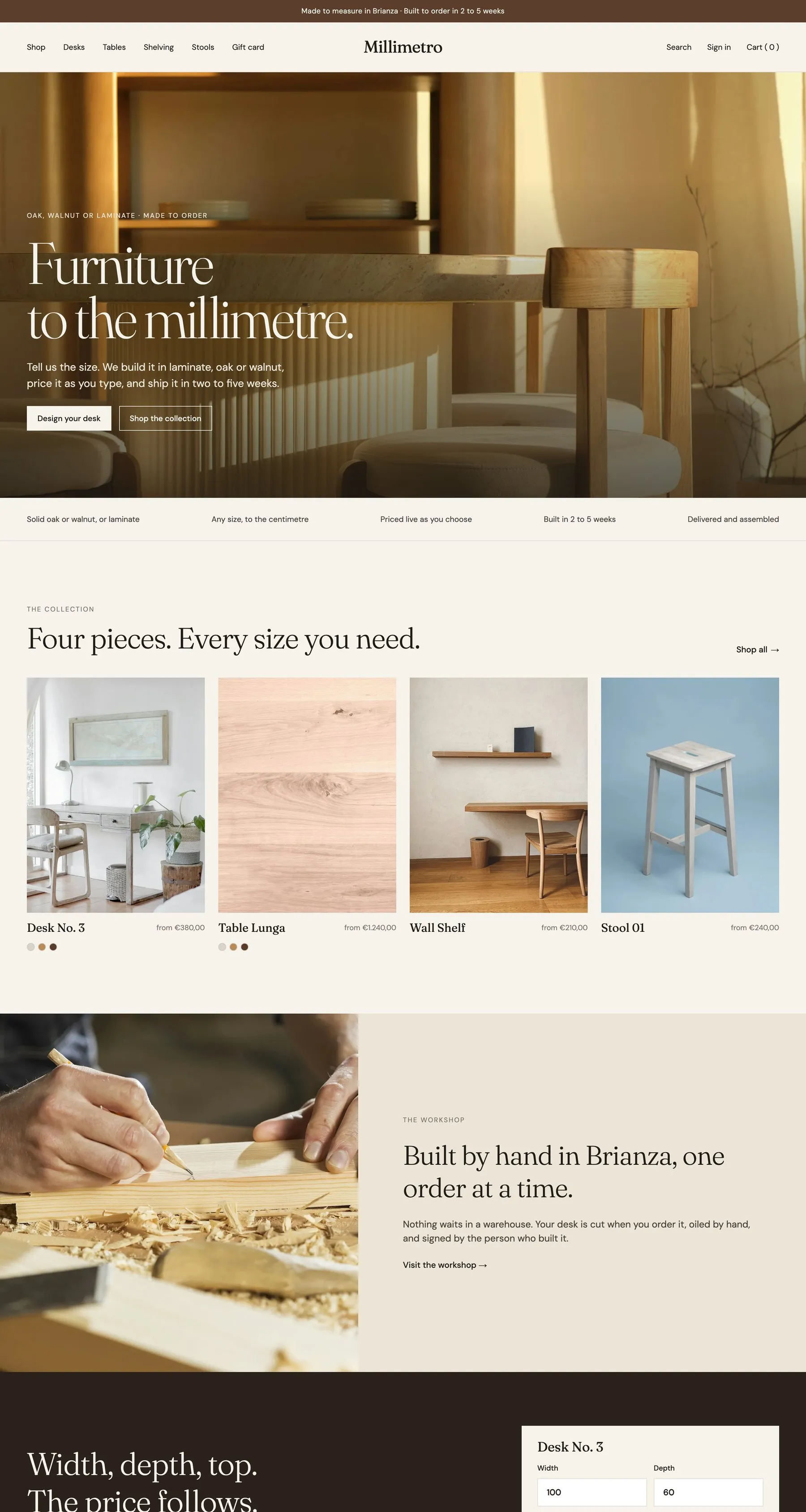 Millimetro: furniture made to measure →
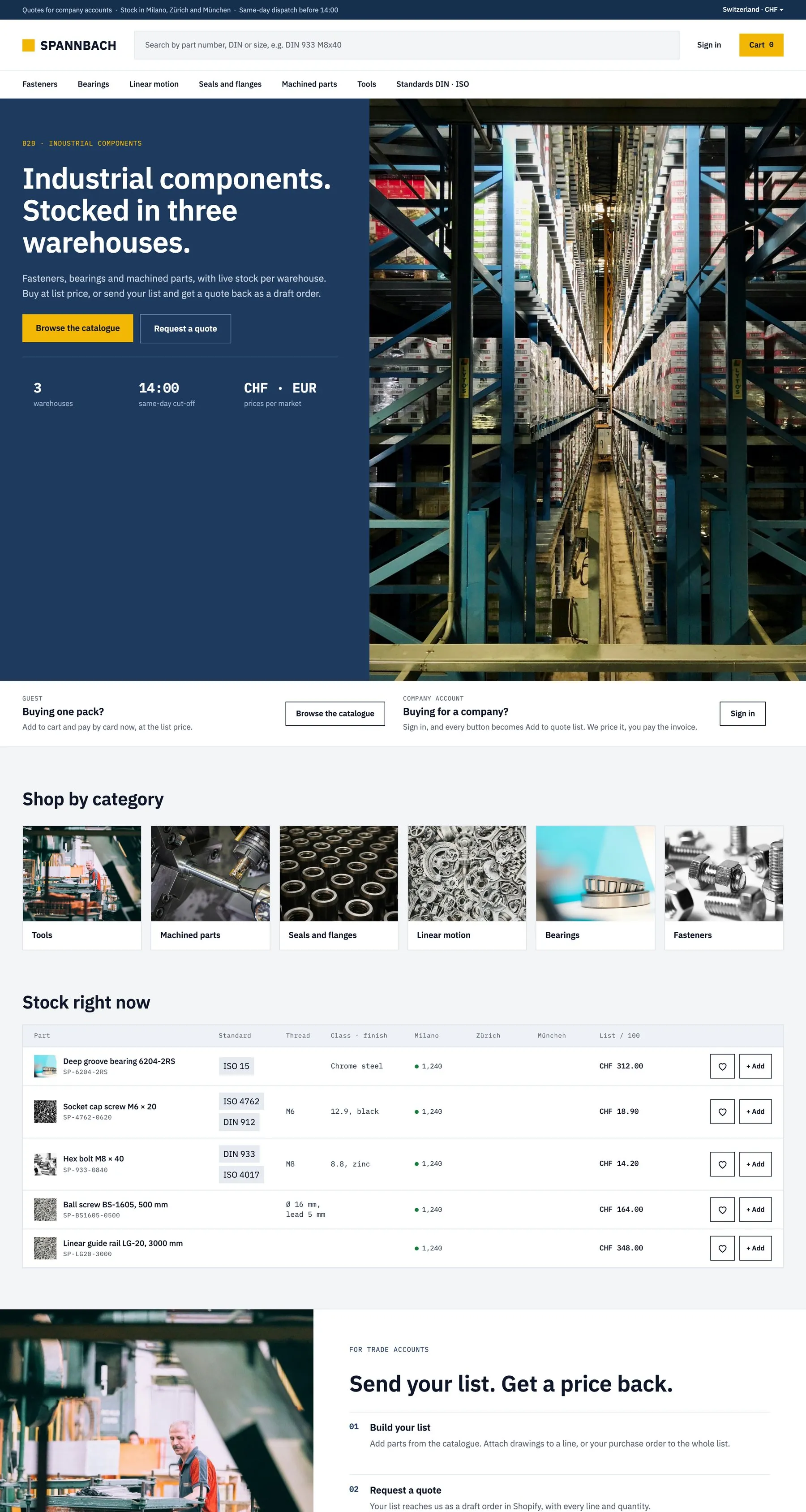 Spannbach: industrial parts for companies →
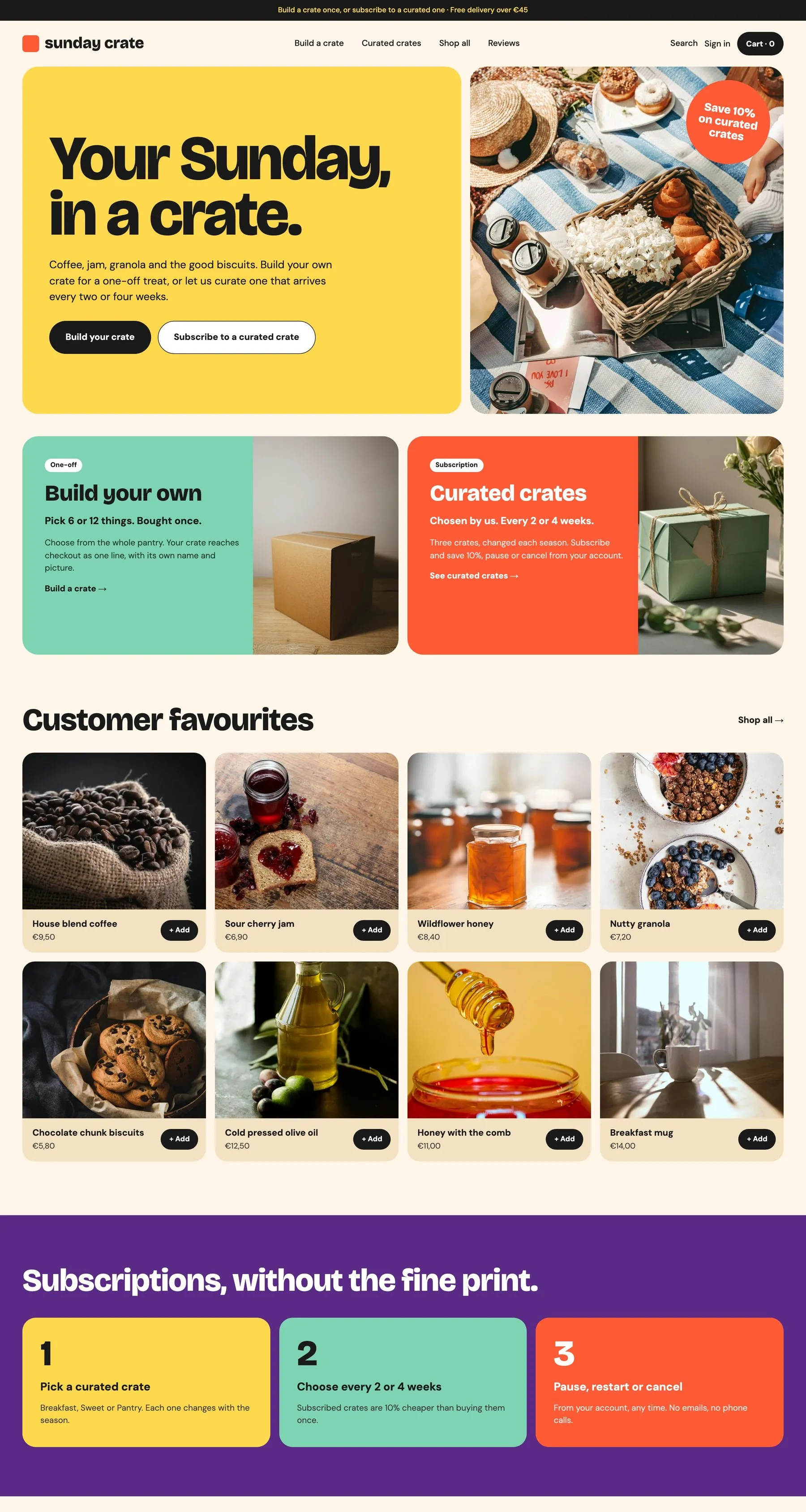 Sunday Crate: breakfast boxes, delivered →
And what 2.0 changes in the markup you already know:
Before: glued on
With 2.0: in your markup
smootify-consent, designed in WebflowCookie bannerproduct="gallery"Product gallerymetafield="…", every typeMetafieldsoption="price-difference"Price of an optionWhat is new
Book a time slot
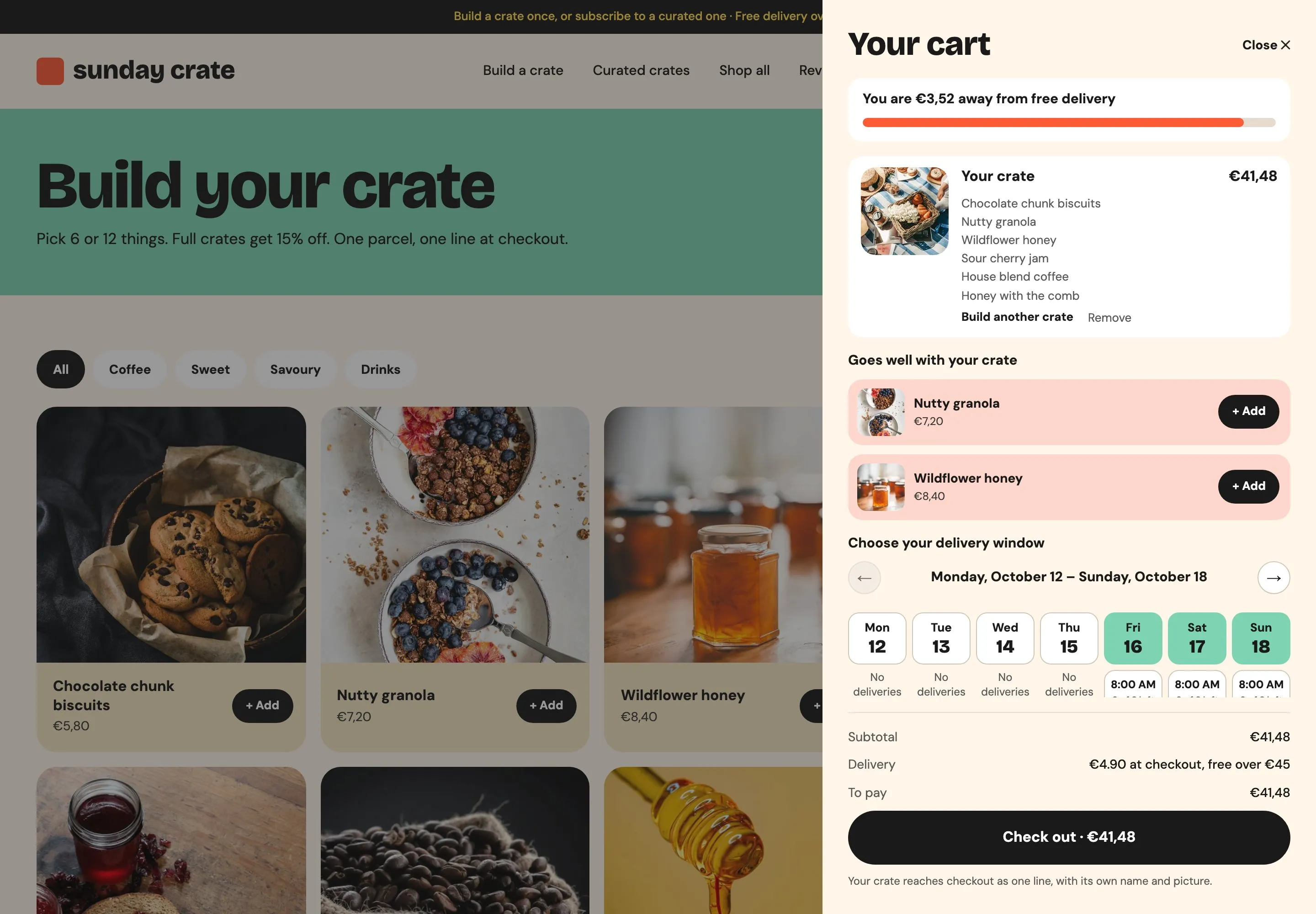
Sell appointments, visits and delivery windows without a booking app. A calendar you design in Webflow books a time slot three ways: an appointment booked with a form and no payment, a paid appointment that goes in the cart with its product, or a pickup or delivery window chosen in the cart. You set the hours on the product in the Shopify admin, and Smootify’s server counts the places, so the last one goes to one customer only. Booking is an add-on of the server plan: see Slot booking.
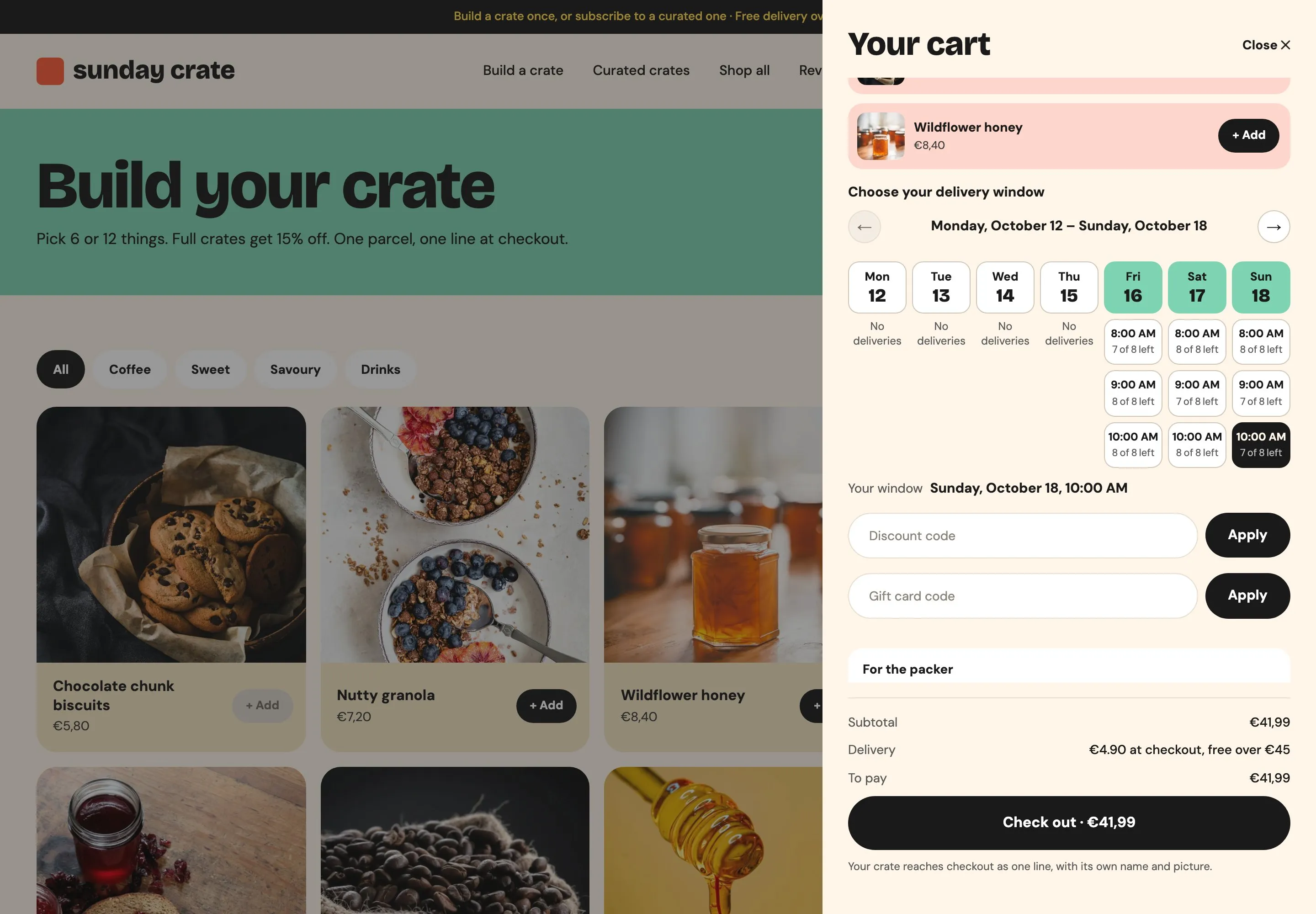 Sunday Crate: a delivery window, picked in the cart →
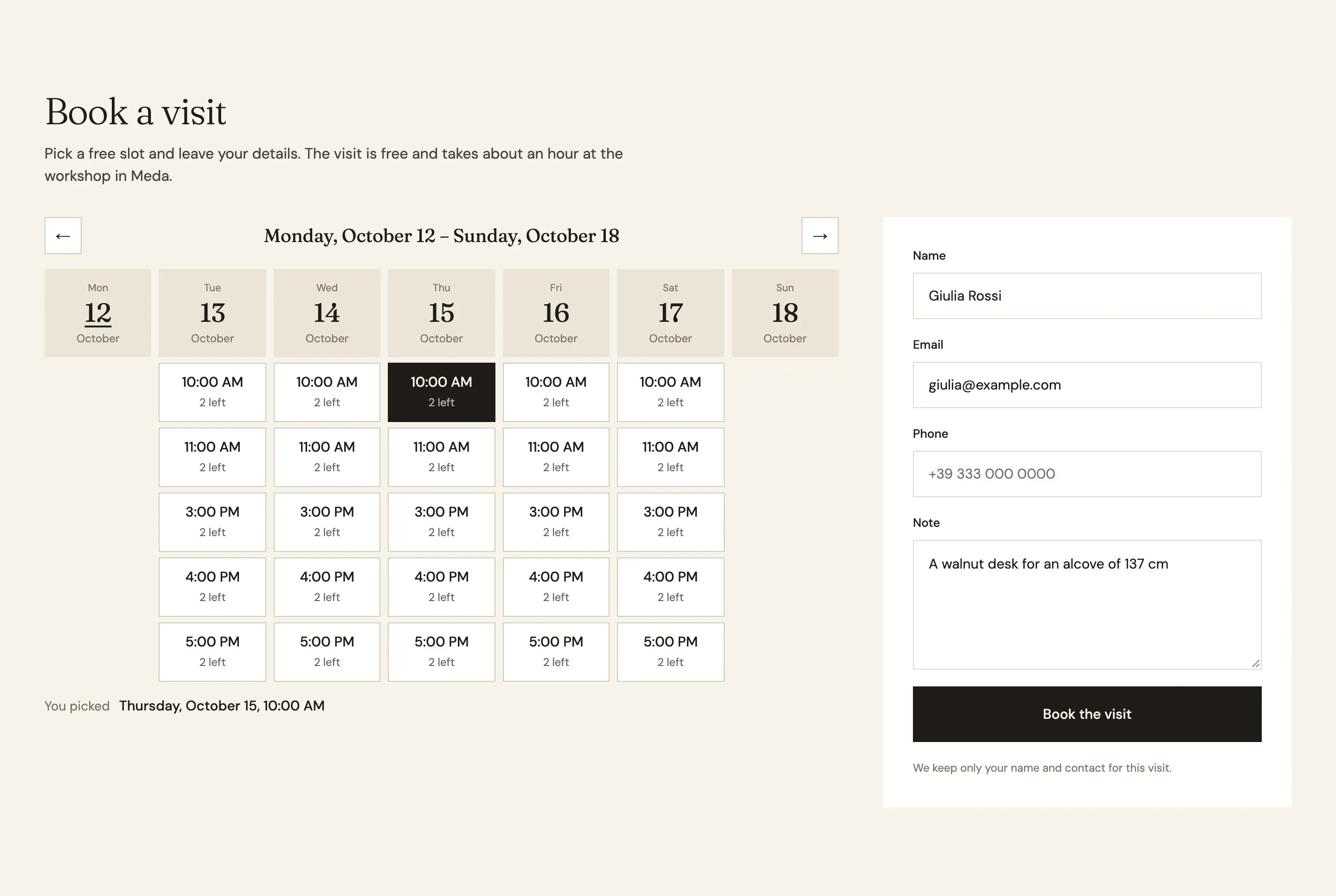 Millimetro: a workshop visit, booked with a form →
Toasts you design
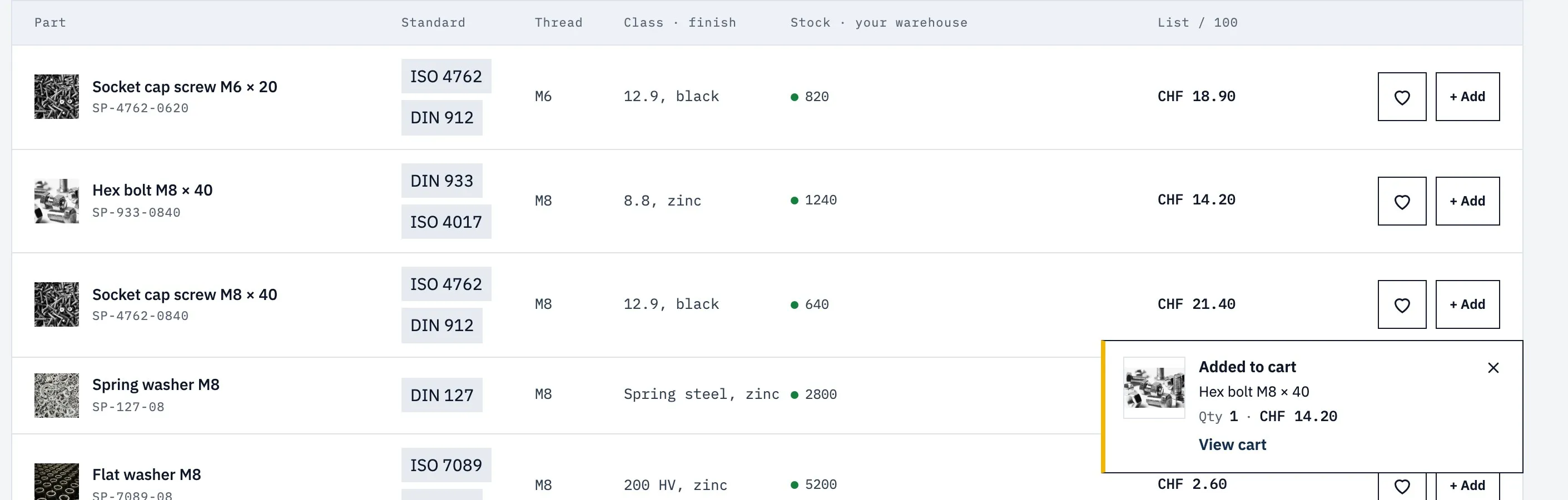
Every add to cart gets an answer, even on a store without a mini cart. A toast is a short message that shows for a few seconds when something happens: a product added to the cart, a wishlist change, a form sent, a link copied, an error from the cart. You design one template per event in Webflow, and only the events with a template show a toast. See Toasts.
The Magic Box remembers
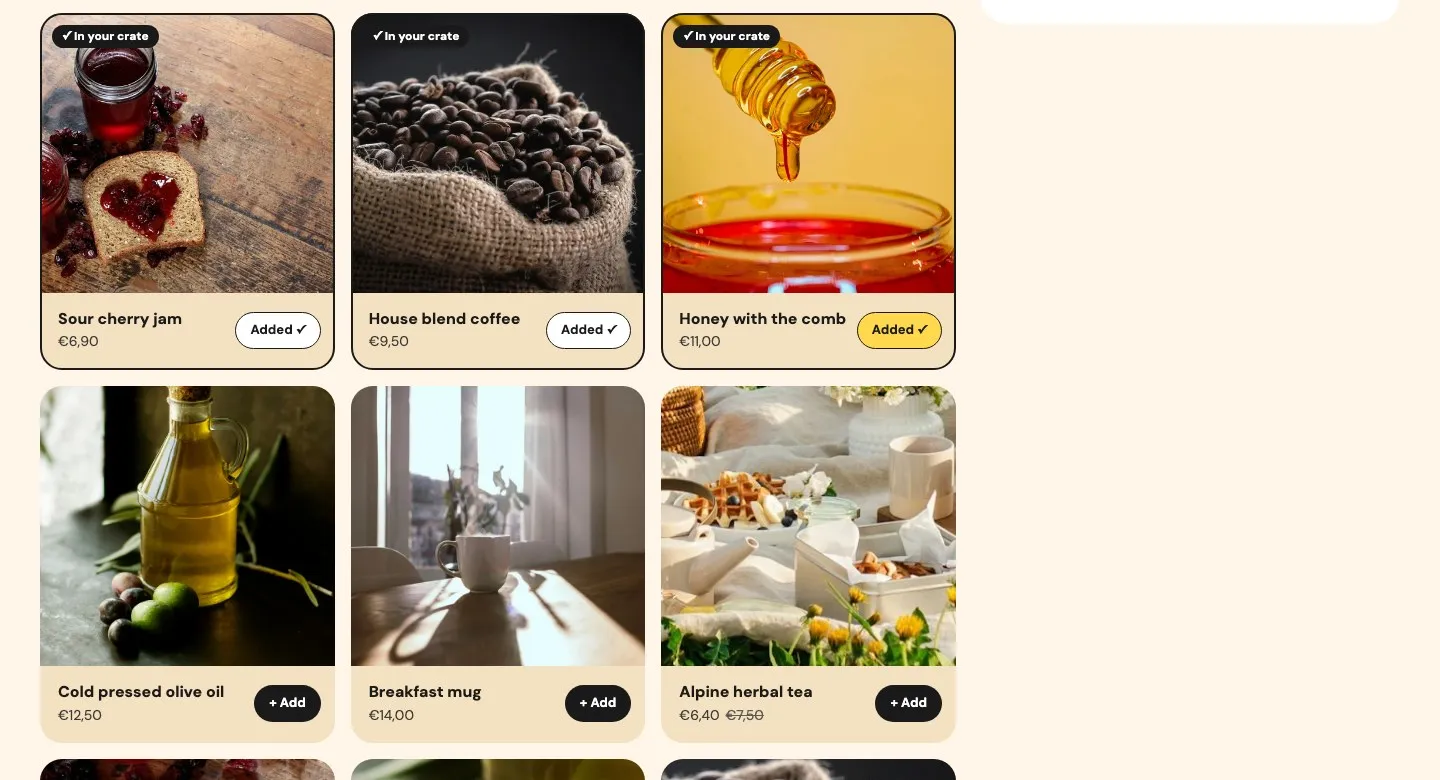
Build-a-box that feels finished. The Magic Box lets the customer fill a box with products you choose, under rules you set, and the box reaches the cart and checkout as one line. In 2.0 the box keeps its pieces through a reload or another page until it goes to the cart, the card of a picked product shows that it is in the box, and the box says how many pieces are still needed. It is in every plan, the free one too: see Magic Box.
A configuration in a link
Made-to-measure products with a live price. The product configurator calculates the price from the customer’s choices with a formula: a price per letter, per square metre, per material. In 2.0, configurator-share shares a link with those choices, and whoever opens it finds the configurator filled in, at the same price. See Product configurator.
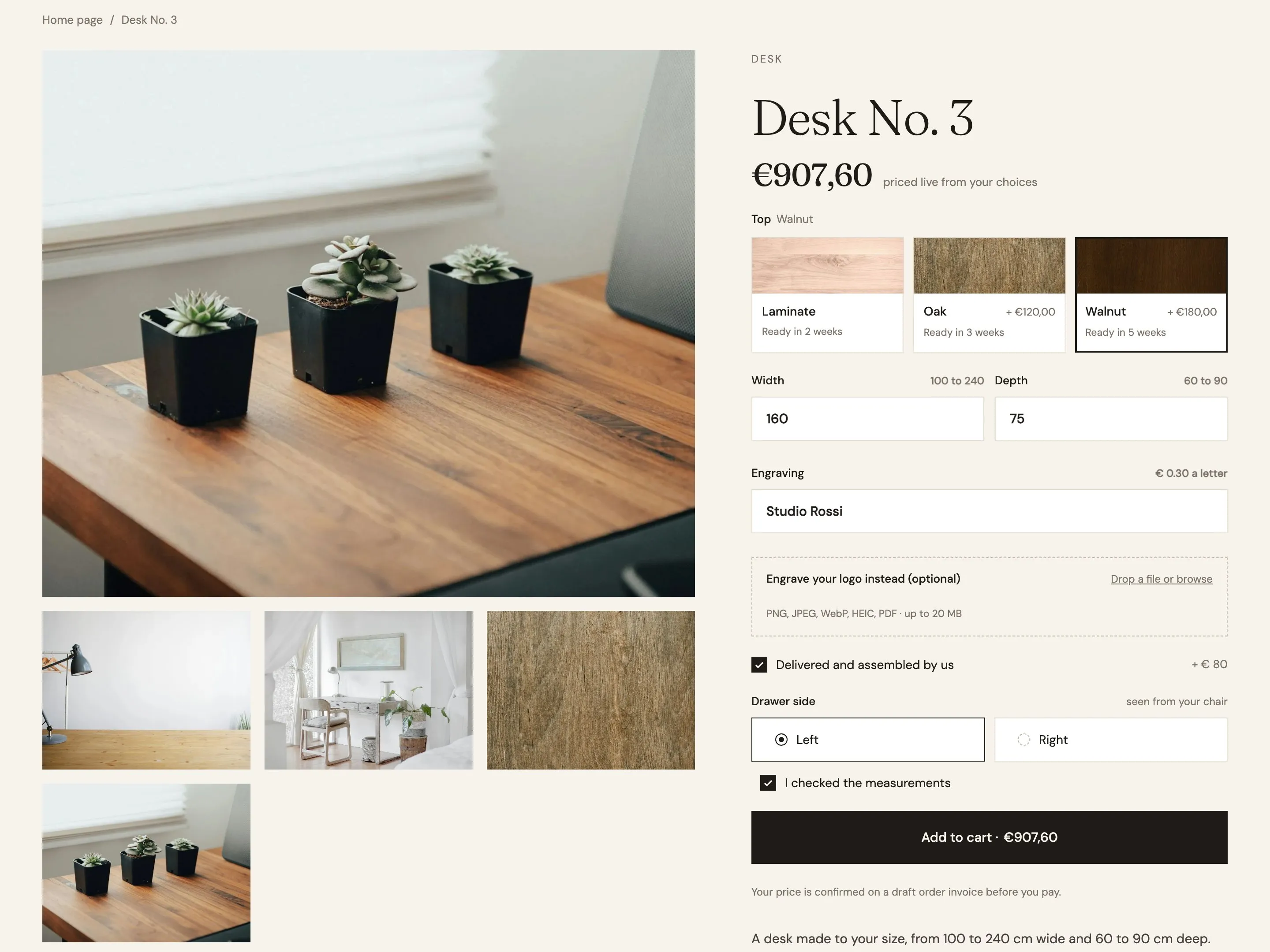 Millimetro: size, wood and engraving, priced as you type →
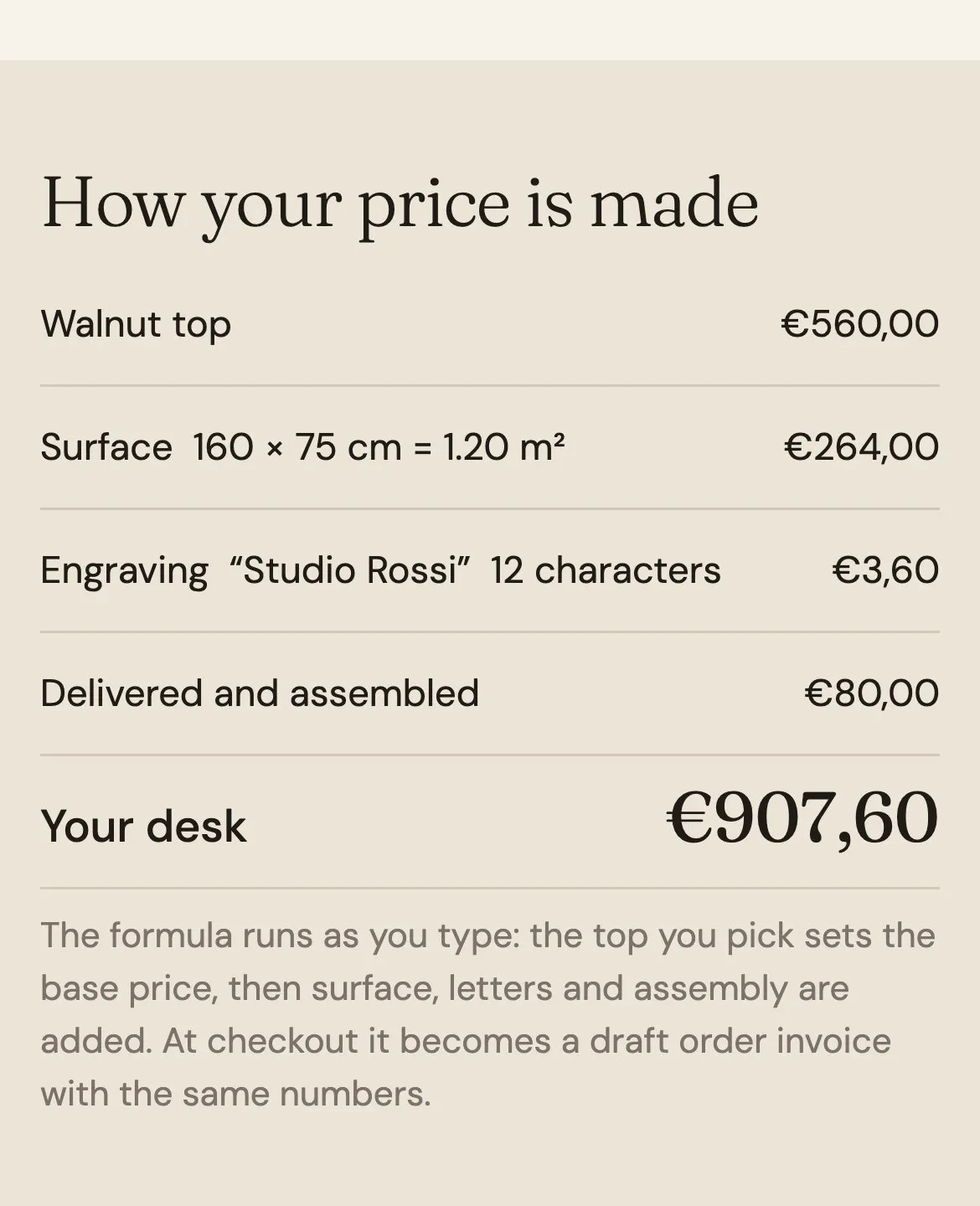 The same price on a phone
Markets that greet the visitor
Sell abroad without a translation app or a currency script. Smootify shows each visitor the Shopify market of their country, with its currency, prices and products. New in 2.0: a market suggestion you design tells a new visitor, once, that the store sells in their country; the page of a product the market does not sell shows your message, with a country switcher; dates from metafields follow the market’s format. See Markets, currencies and languages.
What the beta means
The beta is open to every Smootify account, on every plan.
- Your 1.x site does not change. It keeps its 1.x script and keeps working. It moves to 2.0 only when you replace that script.
- One release on two channels. The 2.0 script loads Smootify from a release channel:
latest,beta, or a version you pin. During the beta,latestandbetaserve the same release. Each beta release and what it changes is in the changelog. - Templates to start from. The 2.0 starter project and the three demo stores are on the Templates page, each with its Figma file and a test checkout you can try.
- New docs. The 2.0 docs are on this site, under Docs. The 1.x docs stay on docs.smootify.io, for the sites that run 1.x.
What else the store does
Nine more things a 2.0 store does without another app. Each card opens its page in the docs:
Search engines read the product
Structured data on every product page: one entry per variant, with its price and availability.
Read the docs →Consent first, then the pixels
The banner designed in Webflow. Meta, GA4, Google Ads and TikTok load only after consent.
Read the docs →The gallery is one block
Slider, thumbnails, lightbox and videos with product="gallery".
Pickers say what a choice costs
option="price-difference" shows "+ €180" next to Walnut.
Every metafield renders
Lists, measures, ratings, colors, JSON and references, with an attribute.
Read the docs →Panels open where you draw them
Mini cart, pickers, search and the market suggestion in Webflow’s Popover.
Read the docs →Lists customers find their way through
Numbered pages, search inside a collection, product lists without the CMS.
Read the docs →Accounts that bring customers back
Buy again from a past order, and wishlists of products or single variants.
Read the docs →Everyone can use it
The chosen value, the sold-out value: the states of the design, read out too.
Read the docs →For developers
window.Smootify is a public API with published TypeScript types, and apps written for Shopify themes keep working: 2.0 answers the Shopify AJAX endpoints a theme app calls, from cart.js to search/suggest.json. Four ways in:
Methods: ask and act
- Use it to
- Read the cart, the products, the customer or the market; add to the cart; open the mini cart.
- For example
getCart(),addToCart(),getCustomer()- Good to know
- Call them from a
pushfunction. Most return a Promise.
Events: react to what happened
- Use it to
- Keep your own counter in sync, track additions, start analytics after consent.
- For example
cart_updated,added_to_cart,consent_changed- Good to know
- What the handler returns is ignored.
oncestops after the first event.
Filters: change it before it happens
- Use it to
- Check or enrich the lines added to the cart, change the checkout address or a draft order, choose the metafields the page asks for.
- For example
add_to_cart_lines,checkout_url- Good to know
- Answer the value changed, nothing to keep it, or
falseto stop.
AJAX API: apps written for Shopify themes
- Use it to
- Run an app's snippet as it is: Smootify answers the theme endpoints on the page.
- For example
/cart.js,/cart/add.js,/products/{handle}.js- Good to know
- Same cart as the page. Start the snippet with
type="smootify-load".
Skills and the MCP
2.0 comes with tools for the agent you build with. The Smootify MCP is a server your agent talks to: it knows every element and attribute of 2.0, checks markup before it reaches Webflow, and audits the pages you publish. The skills are plain files your agent loads to annotate a Figma design, build it in Webflow, audit the site, answer review notes and write custom scripts.
New docs
Rewritten for 2.0, page by page, with a Reference generated from the markup contract.
Open the docs →Smootify MCP
Your agent knows every element and attribute of 2.0, checks markup before Webflow and audits the pages you publish.
Set it up →Five skills
Annotate a Figma design, build it in Webflow, audit the site, answer review notes, write its custom scripts.
See the skills →Smootify Studio
The desktop app keeps the CMS in step with Shopify, and writes a site’s scripts with Claude.
Get the app →Moving from 1.x
When you decide to move a site, most of the markup keeps its names. Shopify has deprecated its classic customer accounts and is removing them, so 2.0 works with the new ones. Three steps:
Move the accounts
- On the live 1.x site, switch the store to the new customer accounts.
- Set
newCustomerAccountsPublicKey: 1.x works with it too.
Switch on .webflow.io
- Replace the two 1.x lines with the 2.0 loader.
- Rename
variationtovariant. - Build the banner with
smootify-consent. - Add
skeletonwhere you want a placeholder.
Go live
- With the debugger clean, publish to your domain.
- To go back, put the two 1.x lines back.
Try it on your .webflow.io address first, with the debugger on (Alt⇧ ShiftD). Links are built as /products/…, /collections/… and /vendors/…, like Shopify, unless you set your own. The whole path is in Move a site from 1.x, and every change in What changes in 2.0.
Start today
Open the 2.0 starter or one of the demo stores, go all the way to a test checkout, then install Smootify 2.0 on your next site. If something does not work as the docs say, tell us: the beta is where we fix it, release after release, until the stable 2.0.