Ask an AI agent to turn a Figma file into a Webflow store and it will build something. The layout will be close. And the product card will be a box with a title, a price and a picture that never change, because nothing in the file says that the title is the product title and the picture is the variant image.
Figma to Webflow with AI works when somebody first writes down what each layer is, in a form the agent can read without guessing. Smootify’s two Figma skills split the job that way: one writes the decisions into the file, the other reads them and builds Webflow.
Two skills, one contract
The Figma annotation skill (figma-annotate-smootify) reads a Figma file and decides, in this order: which Webflow components the design needs, each built once; their variants, props and bindings; the Smootify elements and attributes inside them; and where each instance is placed. Then it writes every decision back into the file as Dev Mode annotations and stops. It never touches Webflow.
The Figma to Webflow skill (figma-to-webflow-smootify) reads those annotations with the Figma MCP and builds the components with the Webflow MCP. It makes no new decisions. If an annotation is unfinished, it stops on that node. On an Astro project it reads the same annotations and writes .astro components instead; this post follows the Webflow build.
Between the two sits a person: you review the annotations in Figma, in Dev Mode, before anything is built. A wrong annotation is cheap to fix there.
What an annotation looks like
Annotations are plain text, one line per layer, in a Figma annotation category called Smootify, made of directives that start with @. The path from Figma to the agent loses things: newlines come back as spaces, double quotes as single quotes, underscores escaped. So an annotation is one line, with no quotes and hyphens in class names.
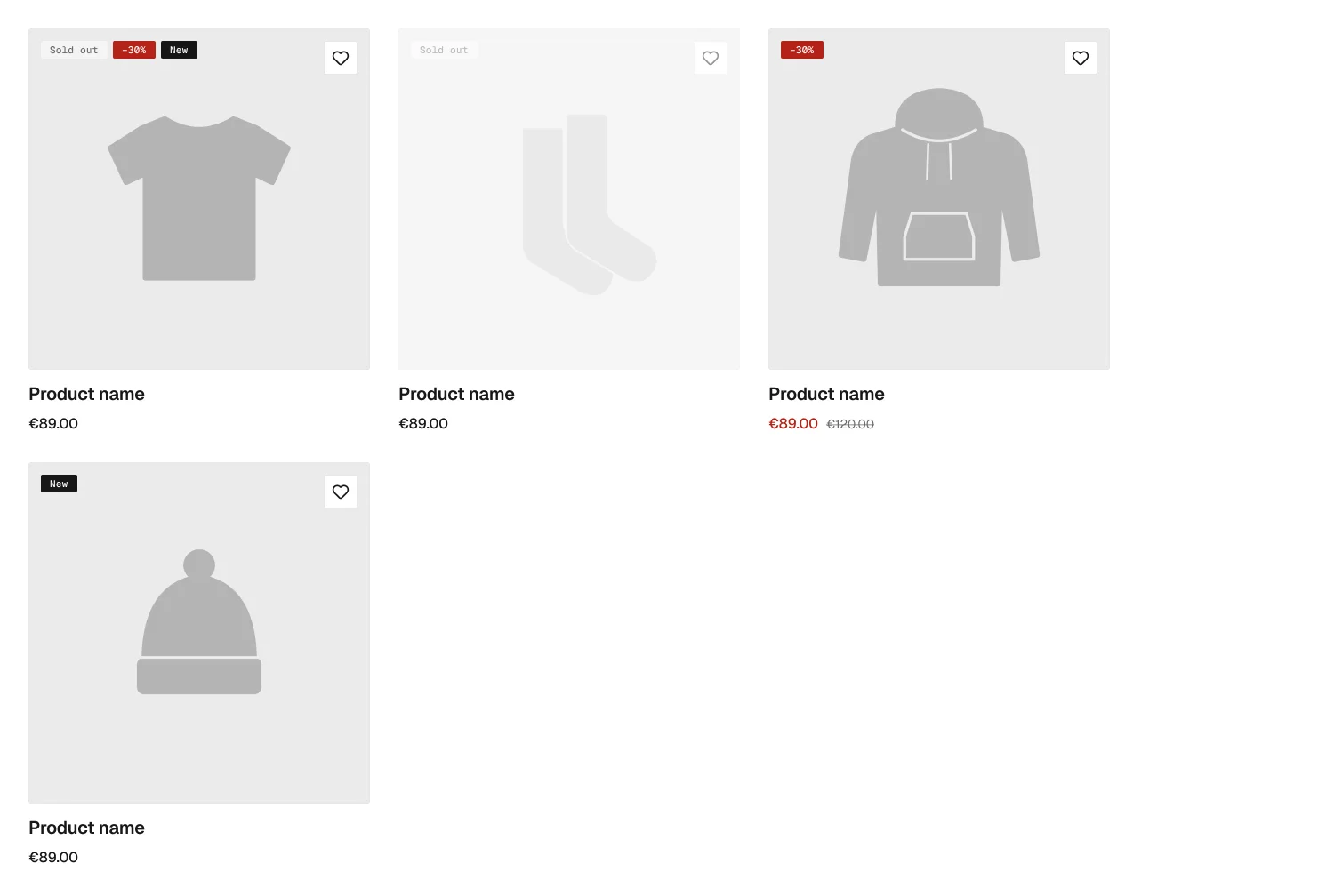
Here is the product card from Smootify’s 2.0 starter file in Figma. Four states are drawn: a default card, a sold-out card, a card on sale and a new product.
The component set carries the component’s identity and its API. A shortened version of its real annotation:
@component: Product card @group: Product @tag: smootify-product @style: sm-product-card
@prop: string Product ID = @bind: attr:data-id = Product ID
@prop: string Image URL = @prop: string Image alt =
@prop: boolean Show badges = true @prop: boolean Hide if in cart = false
@bind: attr:hide-if-product-in-cart = Hide if in cart @axis: State = state
Read it as a list of decisions:
@componentand@groupname the Webflow component: Product card, in the Product group.@tag: smootify-productmakes the root a Smootify product element.@propdeclares a Webflow component prop and@bindconnects it: Product ID fillsdata-id. In a collection list it takes the CMS field Shopify ID; in a Smootify grid, the source, such asfilterorwishlist.@axis: State = statesays the four drawn states are not four components and not Webflow variants. Smootify decides them at runtime. The builder builds one card.
The layers inside carry the Smootify markup:
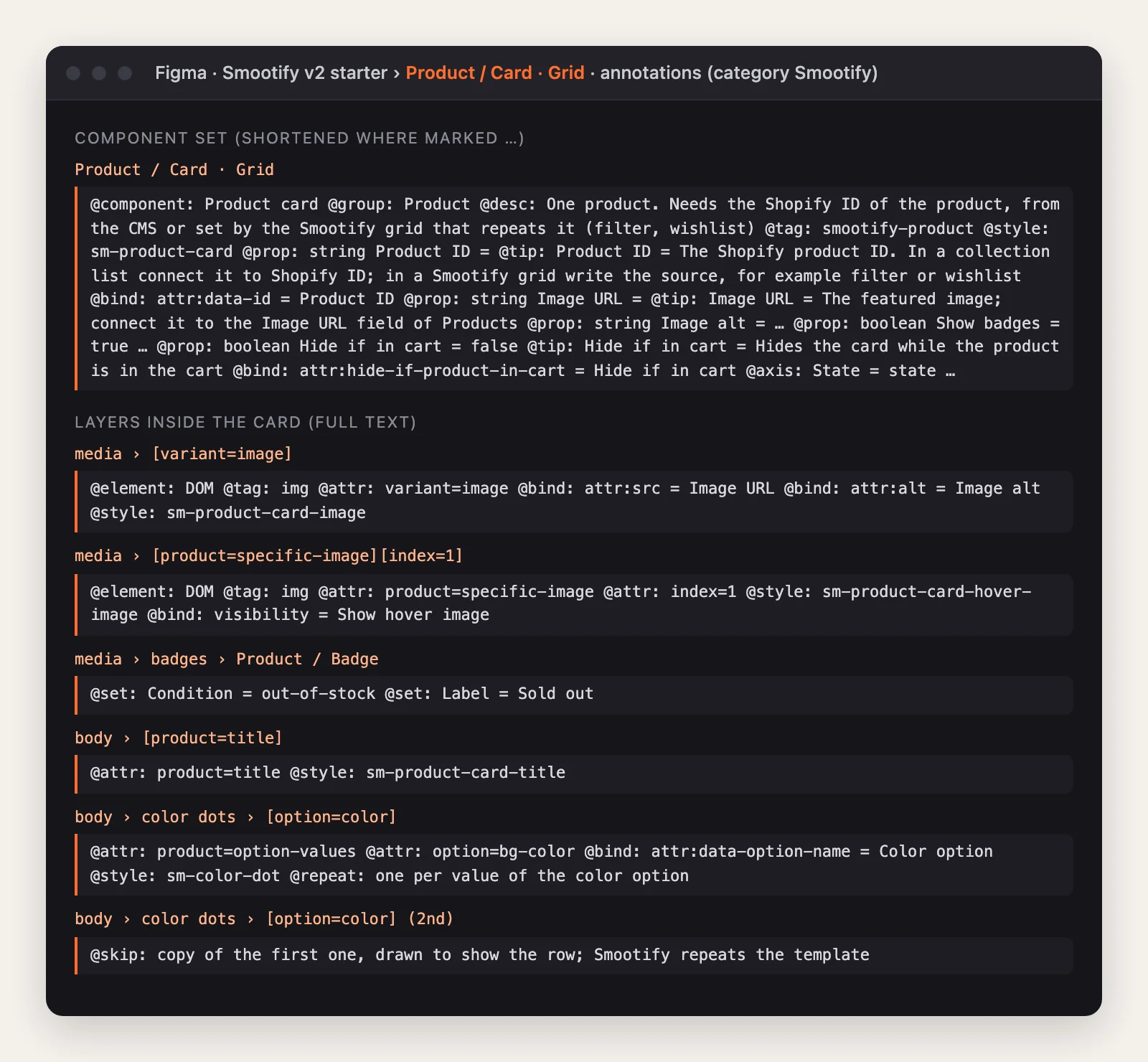
- The picture is an
imgwithvariant=image, itssrcandaltbound to the Image URL and Image alt props: the image stays on Shopify’s CDN and follows the selected variant. - The title is
@attr: product=title. - The colour dots carry
@repeat: one per value of the color option. The three dots drawn after it carry@skip. The designer drew four dots so the row looks real; the builder builds one template and Smootify repeats it. - The badges are instances of one Badge component, with
@set: Condition = out-of-stock @set: Label = Sold out. The file had seven badge masters. One annotation says “one string prop replaces the seven Figma badges”, and the other six become instances of it with different values.
That last point is most of the work the annotation skill does. Design files repeat themselves: the starter also has a horizontal card and a mini card, drawn as separate masters. In Webflow each would be another component to maintain. The skill finds them, asks if they are really the same thing, and writes @use: Product card @set: Variant = Horizontal on the duplicate: same layers, different styles.
It asks instead of guessing
The skill has one rule above the others: when a decision is not settled by what it sees and by its references, it asks. Does this picker choose a variant, an add-on or a configurator field? Is this text a fixed label or data Smootify fills?
Before reading the file it asks what no design can answer: how the product image reaches Webflow, which Webflow site, which Smootify plan, how pickers are built. The answers go on the cover frame as one line; in the starter, @setup: image=url site=none plan=server pickers=popover popover=attributes.
A question nobody can answer yet becomes @ask: on the node, and the builder skips that node’s Smootify part until someone does.
Tags and attribute values come only from Smootify’s references: the 2.0 element catalogue that ships with the skill, and the attribute glossary, which the skill downloads fresh from Smootify’s CDN before it starts. If a value is in neither, it does not exist.
Check the annotations before the build
With the Smootify MCP connected, check_annotations reads the annotated nodes, checks the grammar and the transport rules, then builds the tree they describe and checks it like markup. Here are four annotations with the mistakes people actually make:
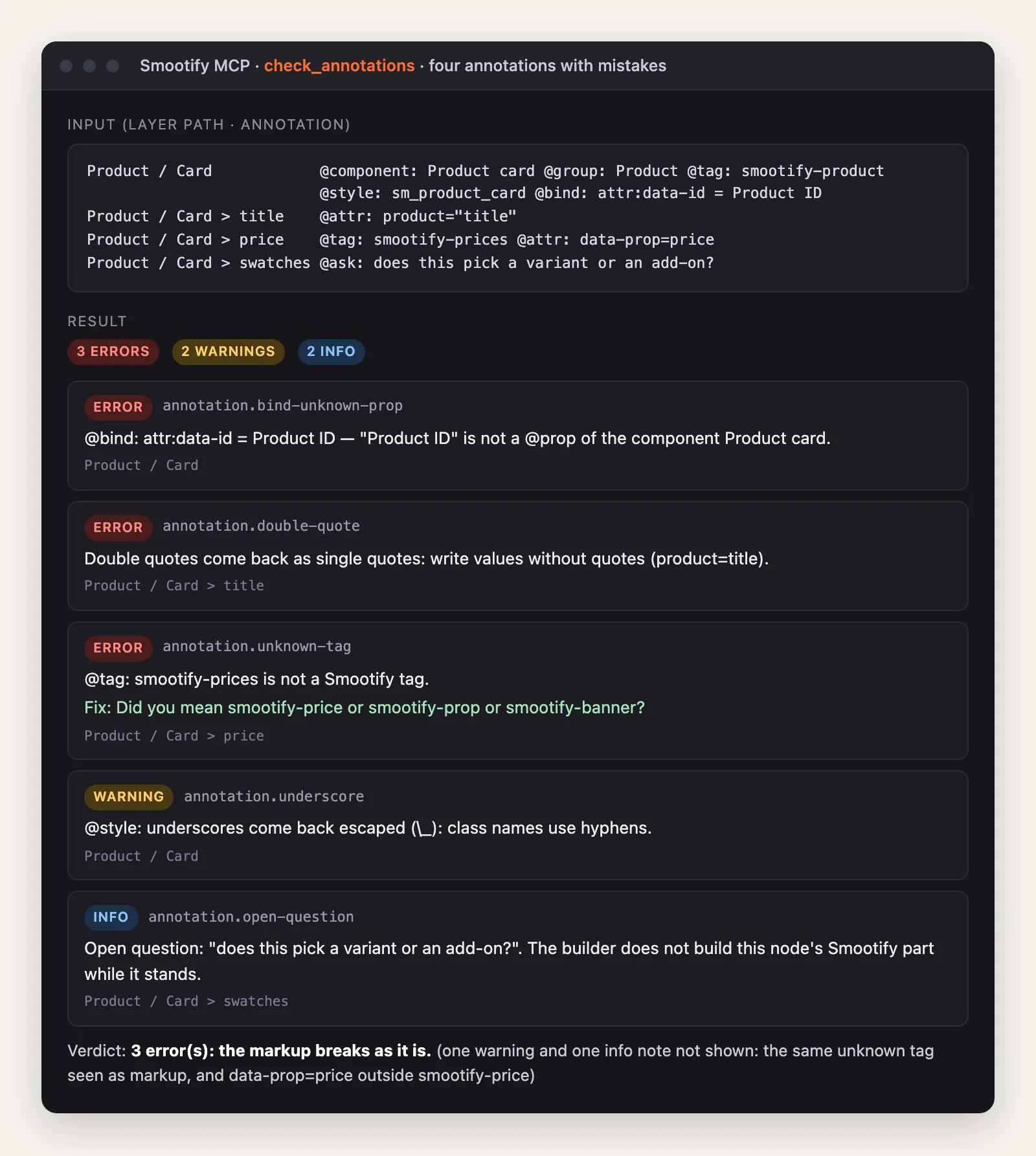
It catches a @bind to a prop that was never declared, the double quotes that would arrive as single quotes, smootify-prices for smootify-price, the underscore in a class, and the open @ask. Run on the real product card and the components inside it, the same tool reports no error and no warning. Its 13 notes all say one thing: the badge, the price, the wishlist button and the stars were checked alone, and they work only inside the smootify-product the card gives them.
How the build skill uses them
The Figma to Webflow skill turns each directive into Webflow MCP calls: the component and its props, the children with their classes and attributes, the bindings, the instances. It never uses Webflow’s HTML builder tool, which deletes custom tags such as smootify-product, drops attributes such as product=title and reports success anyway. It checks every binding, then the published page with Smootify running at three widths. What no tool can do goes into a @manual checklist in its report.
Smootify is one Shopify app with 17 add-ons, billed on the store’s Shopify invoice. The annotations say which of them the build needs, and the @setup line which plan it runs on.
Where people get stuck
Check these first
- The agent builds the drawn copies. Four thumbnails become four elements. Mark one
@repeatand the others@skip. - Every card shows the same product. The Product ID prop is not connected to the CMS Shopify ID in the collection list.
- A state became a Webflow variant. Sold out and on sale are
state, decided by Smootify, not a choice per instance. - The build stops on a node. It has an
@ask. Answer it and remove the line.
The two skills, and what each one does and does not do, are on the skills page. The format they share is in the skill’s references/annotation-format.md, and the Smootify MCP has check_annotations for the check before the build.