An agent that writes Smootify markup for a Shopify store from memory, in Webflow or Astro, makes the same three mistakes. It invents attribute values that sound right. It puts elements where they cannot work. And it writes what Smootify 1.x did, because most of what it read about Smootify was written for 1.x.
None of these mistakes shows in the Webflow Designer or in an Astro build. The page looks finished. The price stays at its placeholder, the swatches never appear, and nobody notices until a customer does.
The Smootify MCP server is how we fixed that. It gives the agent the rules Smootify itself runs on, and checks the agent’s work against them. This post shows real calls and their real output, from 2026-10-15.
What the server is
It lives at https://mcp.smootify.io/mcp. It has 20 tools in five groups: contract and vocabulary, the JavaScript API, examples, checks, and the published site. It answers from the same sources the Smootify runtime and the Webflow app use: the markup contract (113 elements, 48 templates), the 2.0 attribute glossary and the API types.
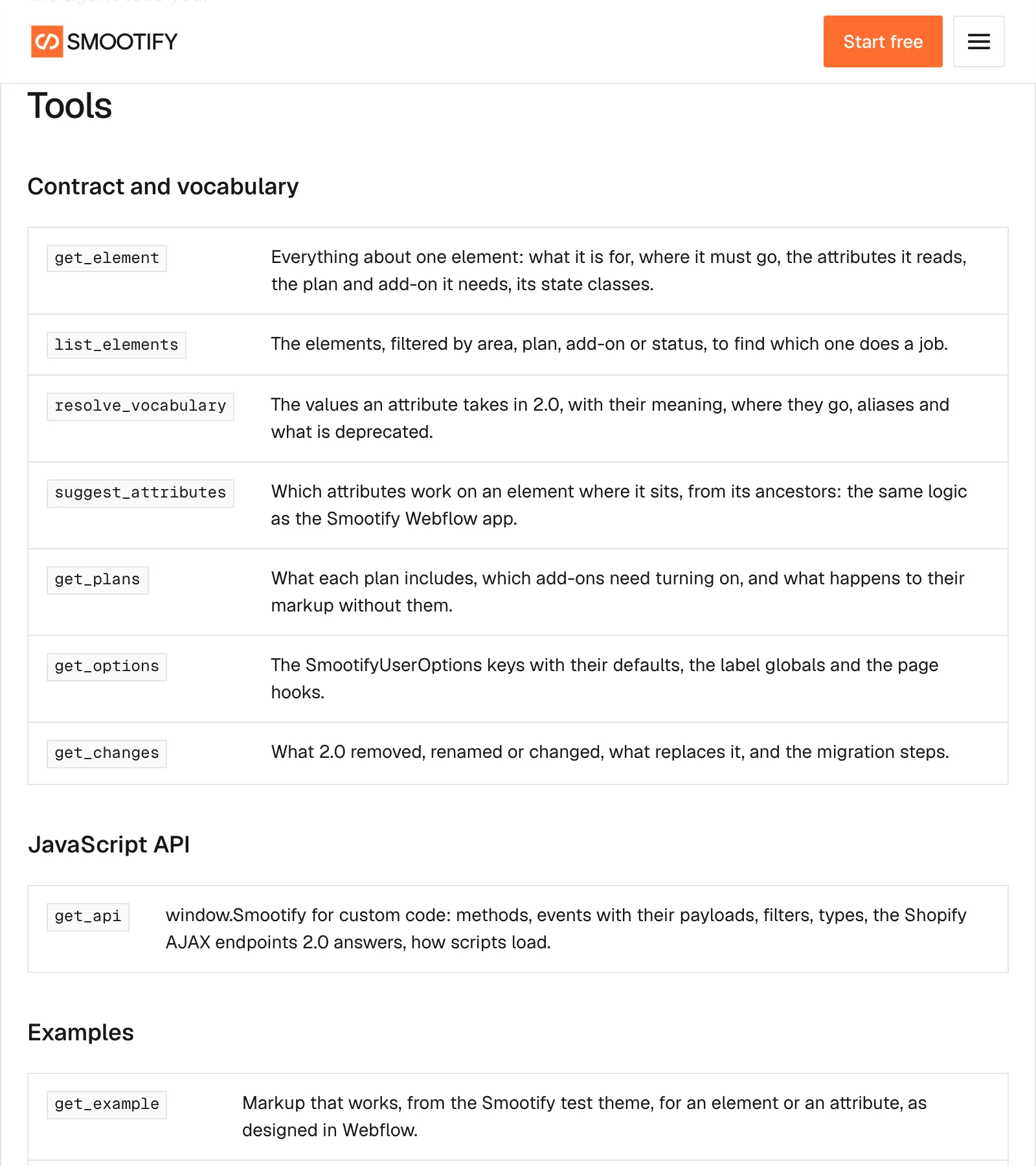
It is read only. It never writes to Shopify and never publishes your site. You sign in with your Smootify account, on any plan, the free one too, and there is no key to copy. In Claude Code it is one line:
claude mcp add --transport http smootify https://mcp.smootify.io/mcpThen run /mcp and sign in. Cursor and Codex take the same address; the setup for each is on the MCP page.
A wrong snippet, checked
Here is a product block written the way an agent writes it from memory, with five mistakes in it. We passed it to check_markup:
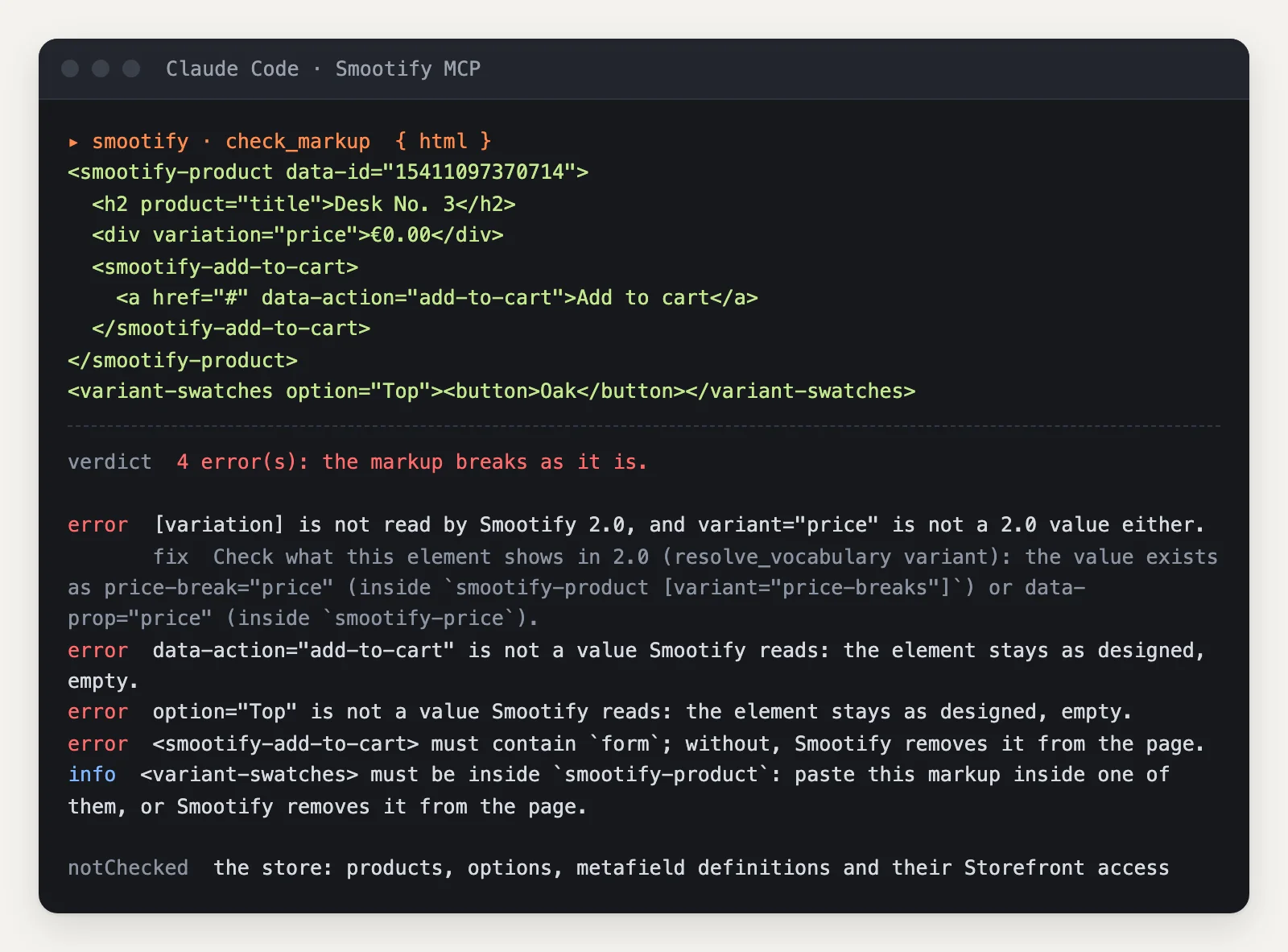
Each finding says what Smootify will do with the mistake, not only that it is one:
variation="price"is a 1.x attribute, and the check does not stop at the rename:variant="price"does not exist in 2.0 either. It says where the price lives instead,data-prop="price"insidesmootify-price(orprice-break="price"in a volume price table).data-action="add-to-cart"is not a value Smootify reads. The link stays as designed, empty.option="Top"onvariant-swatchesis not how the element picks its option.get_element variant-swatchessays it readsdata-optionordata-option-nameon itself.smootify-add-to-cartwith no form inside is removed from the page. In Webflow that means a Form Block.- The swatches sit outside any
smootify-product. This one is an info, not an error, because the check cannot see where the fragment will be pasted. PasspastedInsidewith its ancestors and it checks that too.
Check again after fixing
An agent fixes what the first pass found and checks again. Here the second pass has the price in smootify-price, the swatches inside the form with data-option-name="Top" and a real submit button:
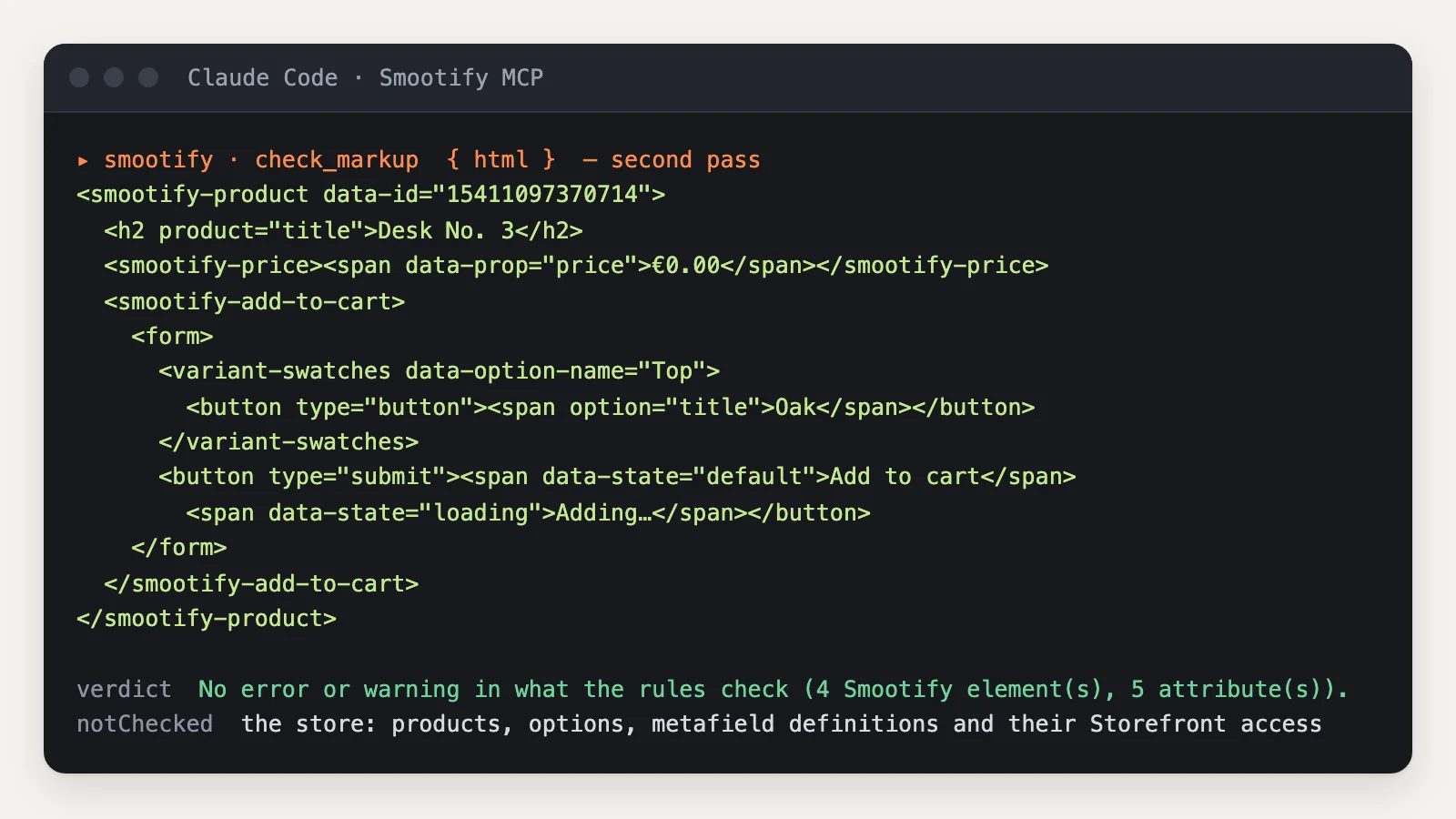
It comes back with no errors. Make the second pass a habit anyway: a fix can bring its own mistake, and checking the result costs one call.
Read the last line too. “Not checked: the store: products, options, metafield definitions and their Storefront access.” A clean check means the markup is right. It does not mean the product has an option called Top. What no rule can check comes back as unknown, never as fine, and the server’s instructions tell the agent to say so to you.
Look it up before writing it
Checking after the fact is the safety net. The better habit is to look up first, and three tools exist for that.
get_element returns everything about one tag. For variant-swatches: it must be inside smootify-product, it must contain a button (one without popovertarget), it reads data-option and data-option-name, and it removes itself when its option is missing or is Shopify’s “Default Title”.
resolve_vocabulary returns the values an attribute takes. cart-item has 19 in 2.0, including some 1.x never had: savings, discount-percentage, sku, unit-price, variant-title. Each comes with the kind of element it goes on: url on a link, image on an image.
suggest_attributes works from where an element sits. An image inside cart-item inside smootify-cart gets cart-item="image" or "product-image", a product metafield, skeleton="image", and the cart and customer conditions. It is the same logic as the Smootify Webflow app.
And when the agent knows the need but not the name, find_capability goes from words to markup. “A quote instead of checkout” returns name="draft-order" inside smootify-cart first, then the checkout_url filter and the draft-order values for the customer’s quote list.
After publishing: audit the live page
The checks above read markup. audit_page reads a published page as Smootify will: which version it loads, the options, the product and collection links, the markup, the inline scripts, the licence for that domain and what the page asks the store for. Here it is on the home page of Sunday Crate, one of our demo stores:
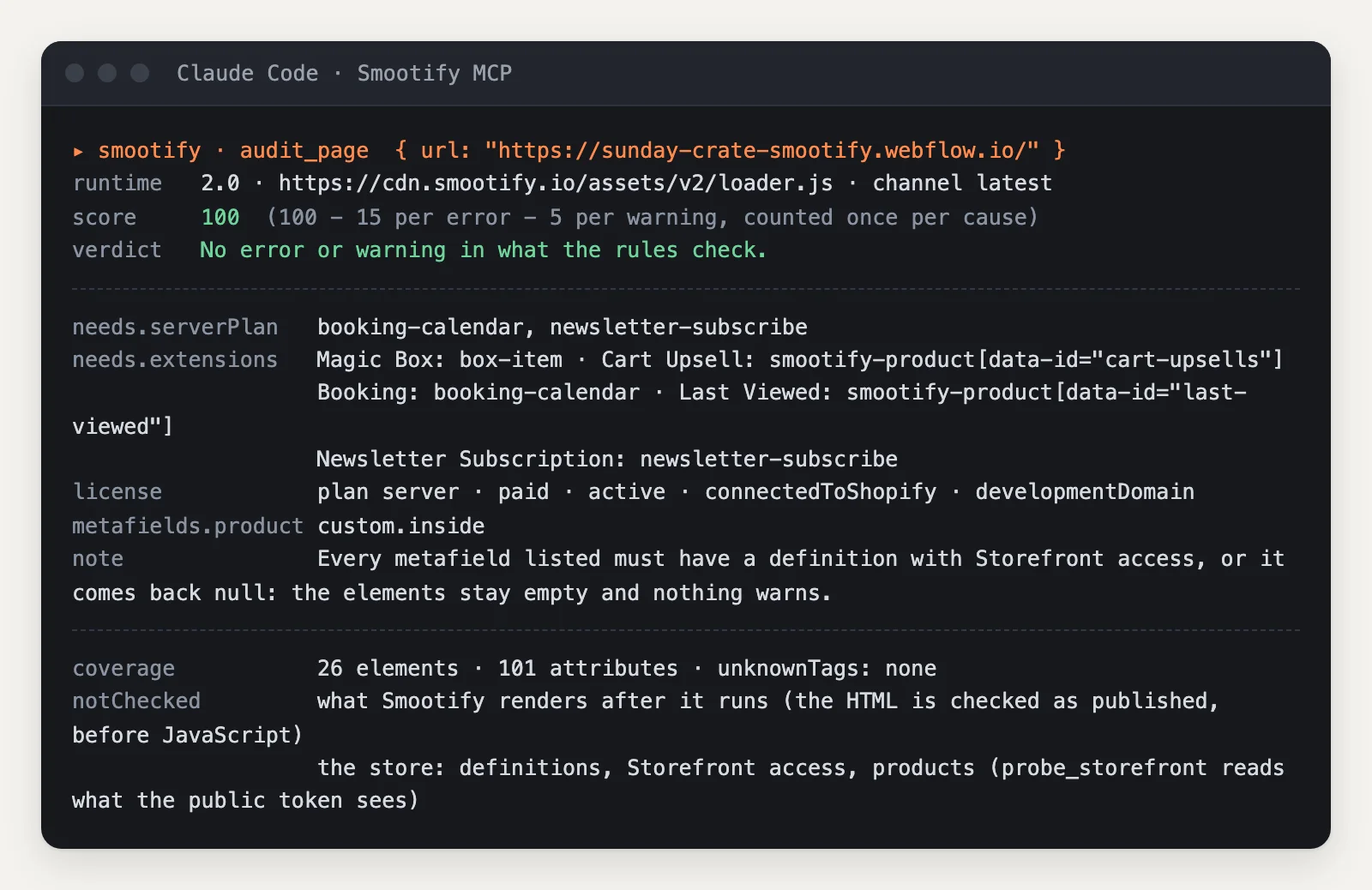
A score of 100, and three things worth reading beyond the score. The page needs the server plan for booking-calendar and newsletter-subscribe. It asks Shopify for the product metafield custom.inside, which must have Storefront access or it comes back empty without a warning. And the audit says what it did not see: what Smootify renders after it runs, and the store’s data. For the store, probe_storefront reads what the site’s public token sees.
audit_site runs the same audit on up to 10 pages, one per template in the sitemap, and merges the findings by cause.
When something does not work
diagnose goes from a symptom to known causes. We asked it why “the price stays at €0.00 on the product page”, with the URL of Millimetro’s Desk No. 3. It audited the page, found nothing on it that matches the symptom, and returned a ranked list of known causes with the check that confirms each. Among them, the classic one: a price outside its smootify-product. The list is ranked by the words of the symptom, and the tool says so: confirm each cause before concluding. That honesty is useful. An agent told “these are candidates” checks them; an agent told “this is the cause” stops looking.
For a site still on 1.x, get_changes lists what 2.0 renamed or removed, and plan_migration turns the migration guide into the steps one page needs, with the script tag to replace. check_custom_code reads the site’s own JavaScript against the 2.0 API.
What trips agents up
Check these first
- The agent reports “unknown” as approval. Ask it to list what the check did not cover. The
coveragefield always says. - A component passes alone and breaks on the page. It was checked as a fragment. Pass
pastedInsidewith the elements it goes into. - The markup is right and the element is empty. The store is missing something: a metafield without Storefront access, an option that does not exist. Run
probe_storefronton the page. - The site loads
cdn.smootify.io/assets/latest/…. That is 1.x. Start fromget_changesandplan_migration.
The MCP is free with any Smootify account. Smootify itself is one Shopify app with 17 add-ons, billed on the Shopify invoice. Pair the server with the skills to go from a Figma file to a store, as described in Figma to store.