
Astro started as a framework for content sites: blogs, docs, marketing pages. It is now used well beyond that, and developers who try it tend to keep it. The reasons are not exotic. Astro sends HTML, it treats content as data, it lets you bring the UI framework you already know, and it does not lock the site to one host.
Those same reasons are why Smootify now has an Astro build. This post goes through what developers like about Astro, point by point, and what each one becomes in a Shopify store built with Smootify.
1. HTML first, JavaScript only where it is needed
An Astro component is a .astro file: a script fence at the top that runs at build time (or on the server), and HTML below it. By default the page ships as HTML and CSS, with no JavaScript for the components. When a part of the page must be interactive, you mark that one component with a directive such as client:load, client:idle or client:visible, and only that component is sent to the browser. Astro calls these islands.
In a store. Smootify was already built around HTML. Its runtime reads ordinary elements with attributes, such as smootify-product and product="title", and makes them work in the browser: prices after a variant change, the cart, the account, filters. So a Smootify component in Astro is plain HTML in a .astro file, with the product’s title, image and price rendered from Shopify at build time:
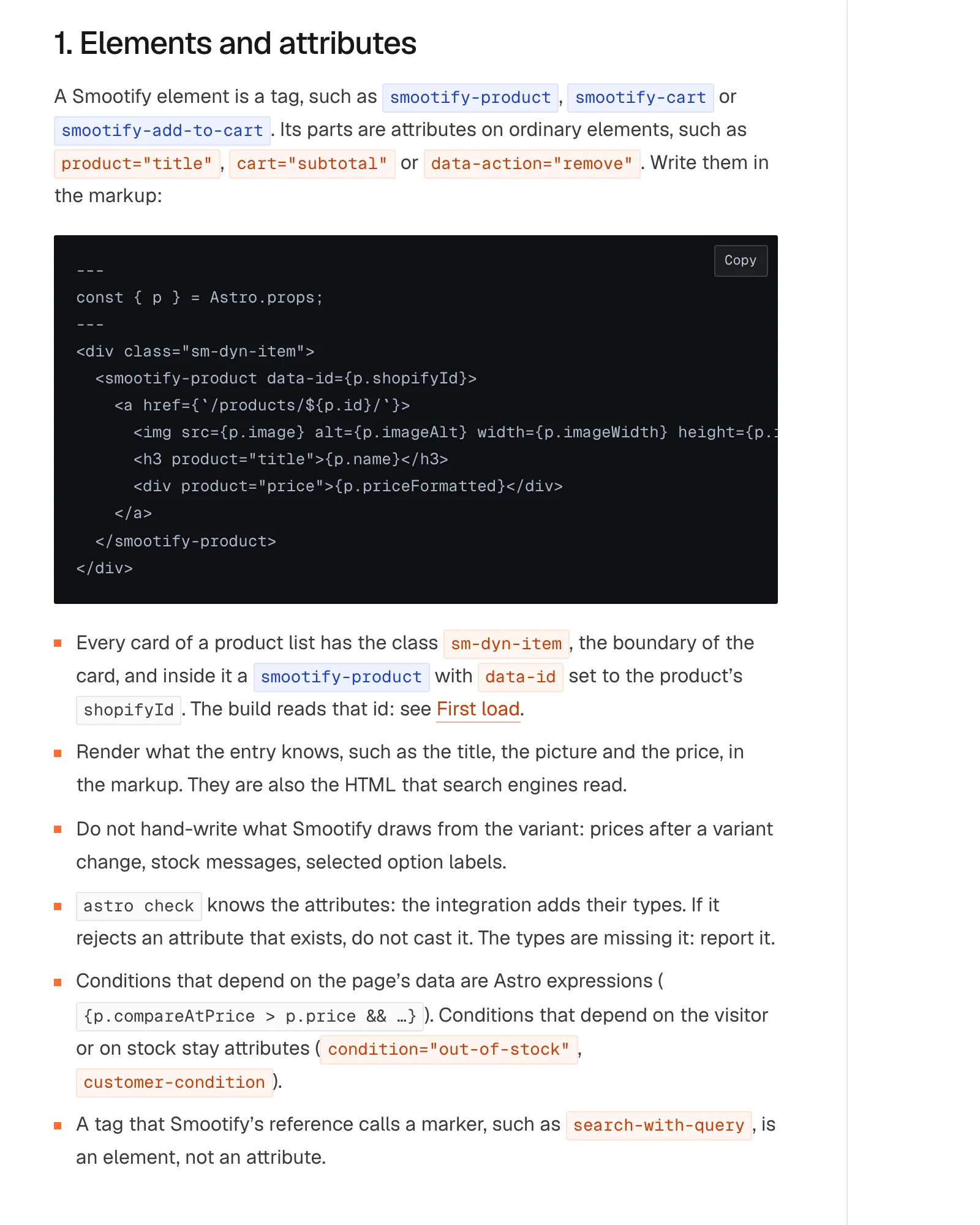
The parts Webflow draws for you become web standards: a dropdown is a [popover] with a popovertarget button, a hidden part is the hidden attribute, a form’s messages are [form-done] and [form-fail]. The Smootify runtime itself loads from Smootify’s CDN; it is not part of your bundle.
2. Content collections and loaders
Astro treats content as typed collections. You define a collection with a loader, which can read Markdown files, a JSON file or a remote API, and Astro stores the entries with a schema. Pages ask for them with getCollection and getEntry, and the editor knows the fields. Live collections, with getLiveEntry, do the same per request instead of per build.
In a store. Smootify ships the loaders for Shopify. Products, collections, vendors, blogs, articles, pages and metaobjects become collections, each with a build loader and a live loader:
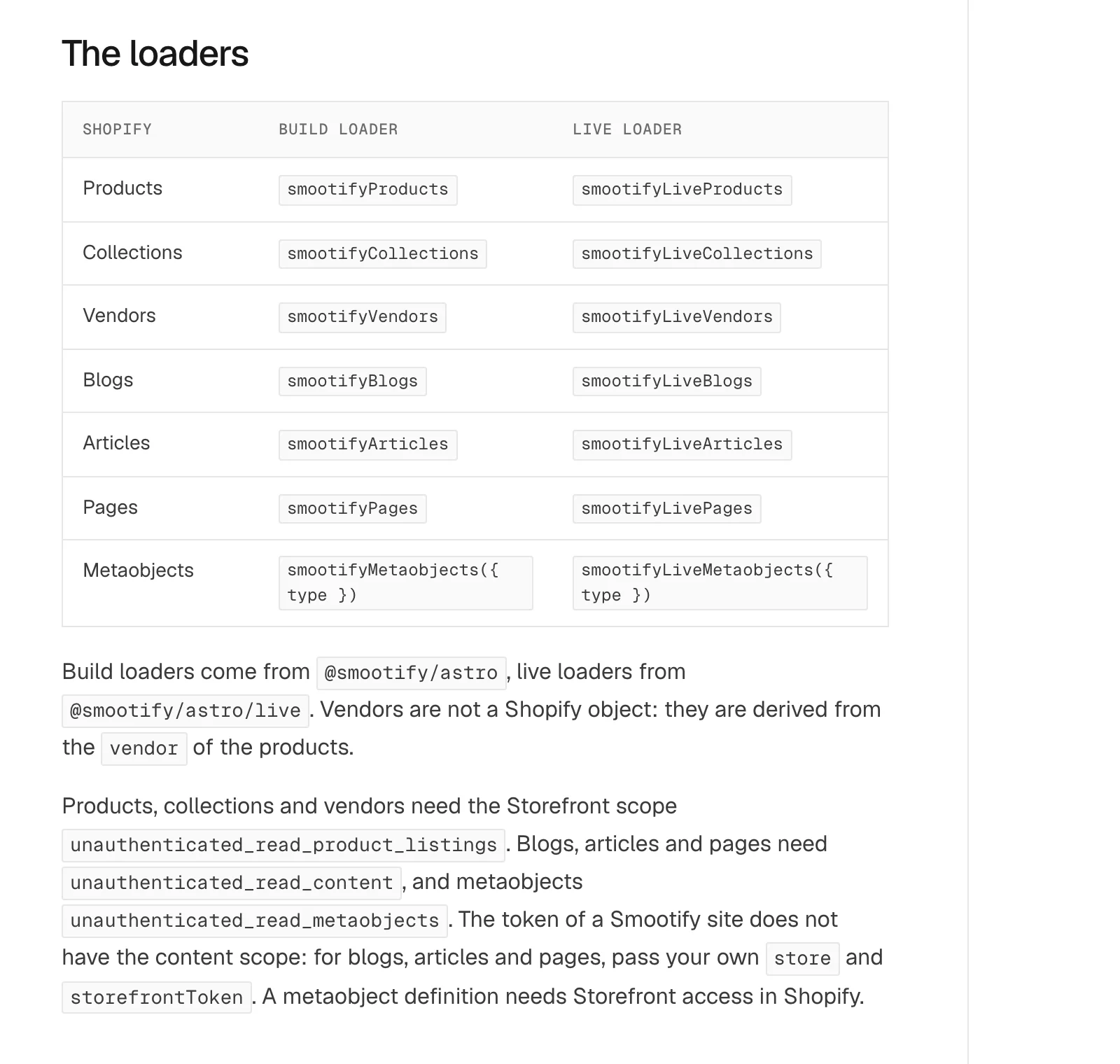
A product entry knows its vendor and its collections as references, so getEntries(p.collections) works. Formatted prices follow the store’s money format, such as €380,00, so the page does not change when Smootify starts in the browser. Metafields you list come parsed by type: a boolean is a boolean, a file reference is a URL.
3. Components from any framework
Astro has official integrations for React, Preact, Svelte, Vue and Solid, and they can sit in the same project. A team that has a React date picker does not rewrite it to use Astro: it drops it in as an island.
In a store. Smootify’s own parts do not need a framework: they are HTML that Smootify reads. That leaves the choice to you for the parts that are yours, such as a room planner next to Millimetro’s configurator, or an animation on the product cards. When Smootify renders or clones something it fires smootify:render on the document, which is the hook a script of your own listens to.

4. Builds that only redo what changed
Astro builds on Vite, so the dev server reloads as you type. Its content layer keeps a store of entries between builds, and a loader can update only what changed instead of fetching everything again.
In a store. The Smootify loaders use that store: on the next build, unchanged entries are not rewritten, and entries that left Shopify are removed. That is what makes a rebuild on every store change practical. A Shopify webhook can start a build, and on a static site built from GitHub, a change is online in about two minutes. The deploy guide goes through it.
5. Adapters for the host you want
Astro builds static files by default. For pages rendered on the server, an adapter fits the build to a host: Cloudflare, Netlify, Vercel and Node have official ones.
In a store. Smootify picked one host and did the work there: Cloudflare. Studio’s project has the @astrojs/cloudflare adapter, the docs cover static and on-demand pages on Workers, and the webhook route uses a Cloudflare Durable Object to merge events into one build. That is the honest limit of the beta: on another host the integration runs, but the automatic updates and Studio’s Deploy tab are written for Cloudflare.
6. Agents work well with it, because it is normal code
An Astro project is text files in a known layout: src/pages for routes, src/components for components, a config file, TypeScript. An agent like Claude reads it the way a developer does, runs astro check and astro build, reads the errors, and fixes them. Every change is a diff in git that a person can review.
In a store. This is the reason the Astro path exists. Smootify’s build skill reads an annotated Figma file and writes .astro components and pages, the Smootify MCP checks the built HTML, and Studio keeps a version after each task so Undo is one click. The rules the agent follows are the same 2.0 contract a Webflow build uses, so the agent does not learn a second Smootify.
Why not Hydrogen?
A developer who likes Astro will know that Hydrogen runs there too: since Hydrogen 2026-10, released in October, it works with any JavaScript framework. It is a great choice if you want to write the store yourself, starting from Shopify’s primitives, such as a Storefront API client, the cart, products, collections and Shop Pay.
Smootify starts further along, and most of the difference is on the server. Bookings with the slots counted on the server, quotes as draft orders, forms that write metaobjects and customer metafields, file uploads, the newsletter, and Magic box and the configurator with prices calculated by Shopify are already written. On the page, the cart, variants and filters are attributes on your HTML, as in point 1, with the same markup as on Webflow. Studio builds the site from the Figma file with Claude.
It saves apps, too. On Hydrogen, bundles, boxes, bookings, quotes, reviews and a wishlist are Shopify apps you install and pay for separately, or code you write. In Smootify they are among the 17 add-ons included in the plan, in place of the 13 paid apps the savings calculator counts.
Is it the right path for you?
Astro suits a team where developers or an agent do the build and the code lives in git. If designers or clients edit the site in a visual tool, or the content is managed in the Webflow CMS, the Webflow path is still the one that fits, with the same Smootify behind it.
The Astro page has the overview, and the Astro docs have everything else.