Free gift above a threshold
A product given for free once the cart reaches an amount: the discount you create in Shopify, the attribute on your cart, what the customer sees and how the gift comes and goes.
A free gift goes in the cart by itself once the cart reaches an amount, such as a tote bag from €50. You set the gift and the amount on a discount in the Shopify admin. On your Webflow site, one attribute on the cart lets Smootify add the gift when the cart reaches the amount and take it out when it drops below. At checkout the discount makes the gift free.
Note
The discount comes with the Smootify app in Shopify. It works on every Shopify plan and on every Smootify plan, the free one too, with no add-on to turn on.
1. Create the discount in Shopify
In the Shopify admin, open Discounts → Create discount, and under Smootify choose Gift above a threshold.
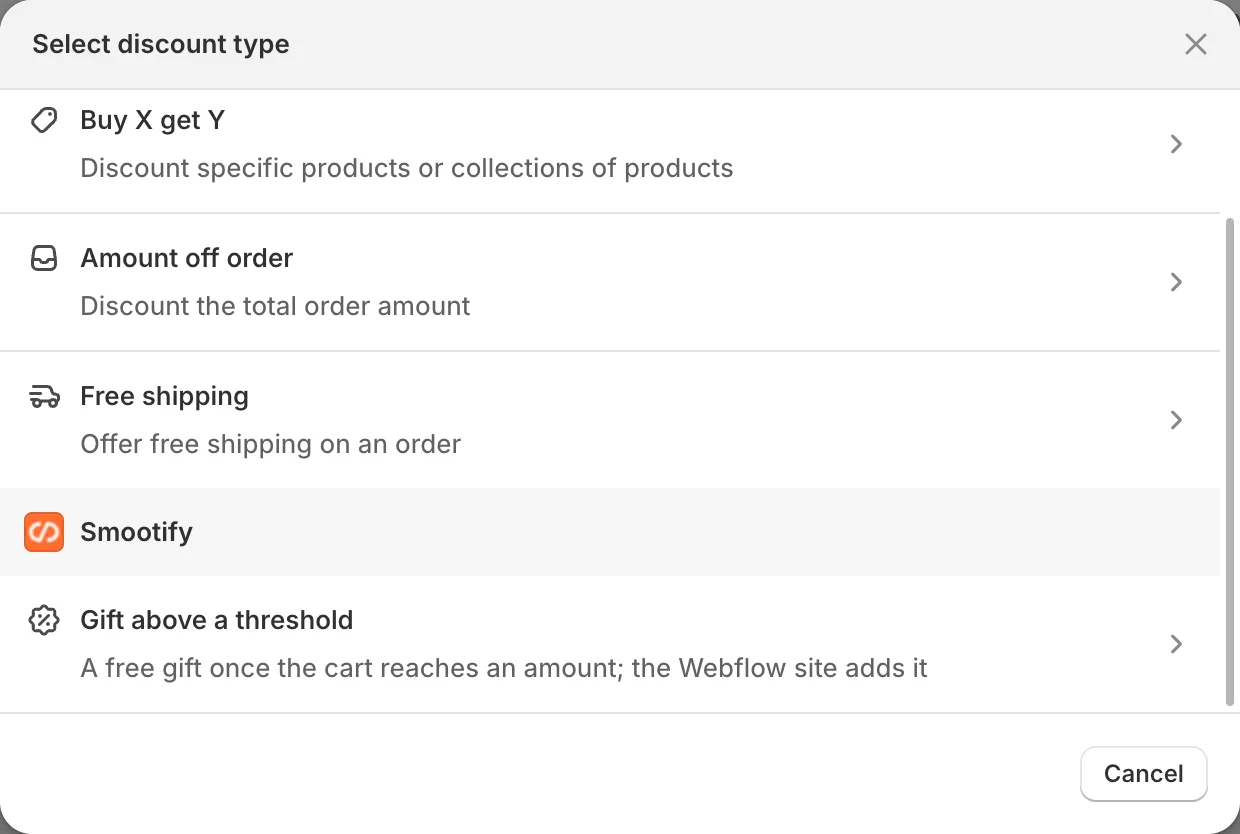
- As the method, choose Automatic discount, not a discount code.
- Pick the gift: the variant the customer gets.
- Set how many pieces are free.
- Write the threshold, one currency per line, with the amount:
EUR 50,CHF 55. - Write the message the customer reads at checkout.
- Save the discount, and check its dates and its combinations with your other discounts.
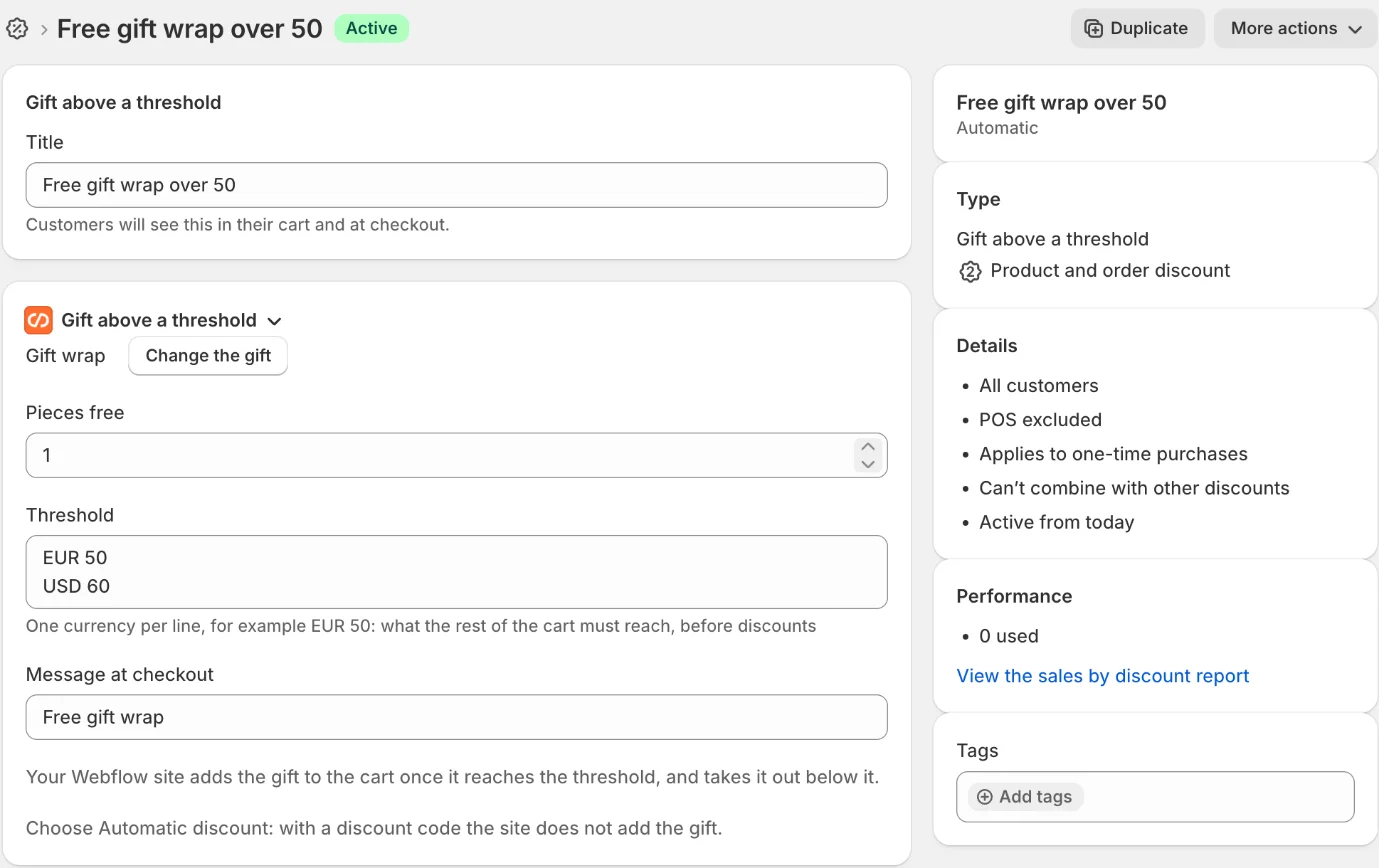
The threshold counts the rest of the cart, before discounts and without the gift, in the cart’s currency. A currency you do not write gets no gift.
2. Turn it on in the cart
On your site’s smootify-cart, add the custom attribute data-free-gift, with no value:
data-free-gift="false" turns it off, which is useful when the cart is a Webflow component with a true or false property. Any other value, or no value, turns it on.
Put it on the cart that every page has, such as the mini cart in the navbar: the gift comes and goes on the pages that have this cart. You add nothing else: the gift is a normal line of the cart you already built.
What the customer sees
- In the cart, the gift is one more line, with its total at 0. The line has no quantity field, even if your
cart-itemhas one: the discount decides how many pieces are free. The remove button stays. - At checkout, the gift is free, with the message you wrote on the discount.
How the gift comes and goes
- It goes in when the cart reaches the threshold, and comes out when the cart drops below it.
- The customer removes it: it stays out while the cart stays above the threshold. If the cart drops below it and then reaches it again, the gift comes back.
- Shopify does not make it free, for example because the discount ended or does not combine with another discount on the cart: the gift comes out, and stays out while the cart stays above the threshold.
- The gift is sold out: it does not go in.
- Smootify reads the gift, its pieces and its threshold once per visit. After you change the discount, check the site in a new private window.
A tote bag from €50, in three states of the same cart:
Gift above a threshold: Tote bag, 1 piece,
EUR 50Webflow <smootify-cart data-free-gift>Below the threshold
- Cart
- €38 of €50. No gift line.
- Counts
- The rest of the cart, before discounts, in the cart's currency.
Above the threshold
- Gift line
- Tote bag · €0.00. No quantity field, even if your
cart-itemhas one. The remove button stays. - Checkout
- Free, with the message of the discount.
Removed by the customer
- Above
- The gift stays out while the cart stays above the threshold.
- Comes back
- After the cart drops below the threshold and reaches it again.
Before you publish
Check these first
- The gift never goes in. The discount is a discount code: with a code the gift is not free until the customer types it, so the site leaves it out. Create it as an Automatic discount.
- No gift in one currency. The threshold has no line for that currency. Add one, such as
CHF 55. - The gift goes in and comes out at once. Shopify does not make it free: the discount has ended, or it does not combine with another discount on the cart. Check its dates and its combinations.
- Nothing happens on the site.
data-free-giftis missing fromsmootify-cart, or it is set tofalse. - The gift is not added even above the threshold. The gift variant is sold out, or not published to the Headless channel.