
Every small feature a store adds tends to arrive as an app. Reviews are one app, back-in-stock alerts another, warranty registrations a third, reseller applications a form tool and a spreadsheet. Each has a monthly fee, its own dashboard and its own copy of your customers’ data.
Most of them do the same thing underneath: a visitor fills in a form, the answers are kept somewhere, something happens next, and sometimes the answers show up on the site. With Smootify 2.0, that whole loop runs in the tools you already have:
Webflow writes, Shopify keeps, Flow reacts, Smootify reads back.
The form is a normal Webflow form. Each answer becomes a metaobject entry in your Shopify store, the free Shopify Flow app reacts to it, and Smootify shows the entries on your site. No backend of yours sits in between. Here is the difference with a plain Webflow form:
A Webflow form
- Data goes to
- Webflow's form submissions.
- On the site again
- No.
- Automations
- Webflow's form emails.
The metaobject creator
- Data goes to
- Shopify, as metaobject entries.
- On the site again
- Yes, with Show metaobjects.
- Automations
- Shopify Flow.
The easiest way to see it is to follow one case from start to finish. Sunday Crate, our demo store for breakfast boxes, collects its reviews this way.
One case, start to finish: reviews
1. Shopify keeps the shape. Under Settings › Custom data › Metaobjects, the store defines a review: rating (a rating from 1 to 5), title and author (single line text), body (multi-line text), would_buy_again and favourite_item (single line text) and photo (a file). Its definition also has a product reference, which this form leaves empty. Two settings matter. Active-draft status, so each review can wait as a draft. Storefronts access, so the site can read the reviews back.
2. Webflow writes. On the Reviews page, a Webflow Form Block sits inside a Custom element with the tag metaobject-creator. The Name of each field is the key of a field in Shopify. The rating is five Radio buttons named rating, drawn as stars; the photo is a file-input that takes images up to 10 MB:
The layout and the drop zone are yours. The rating sends a plain number, such as 4, and Smootify’s server writes it on the field’s scale. While the photo is still uploading, the form cannot be sent.
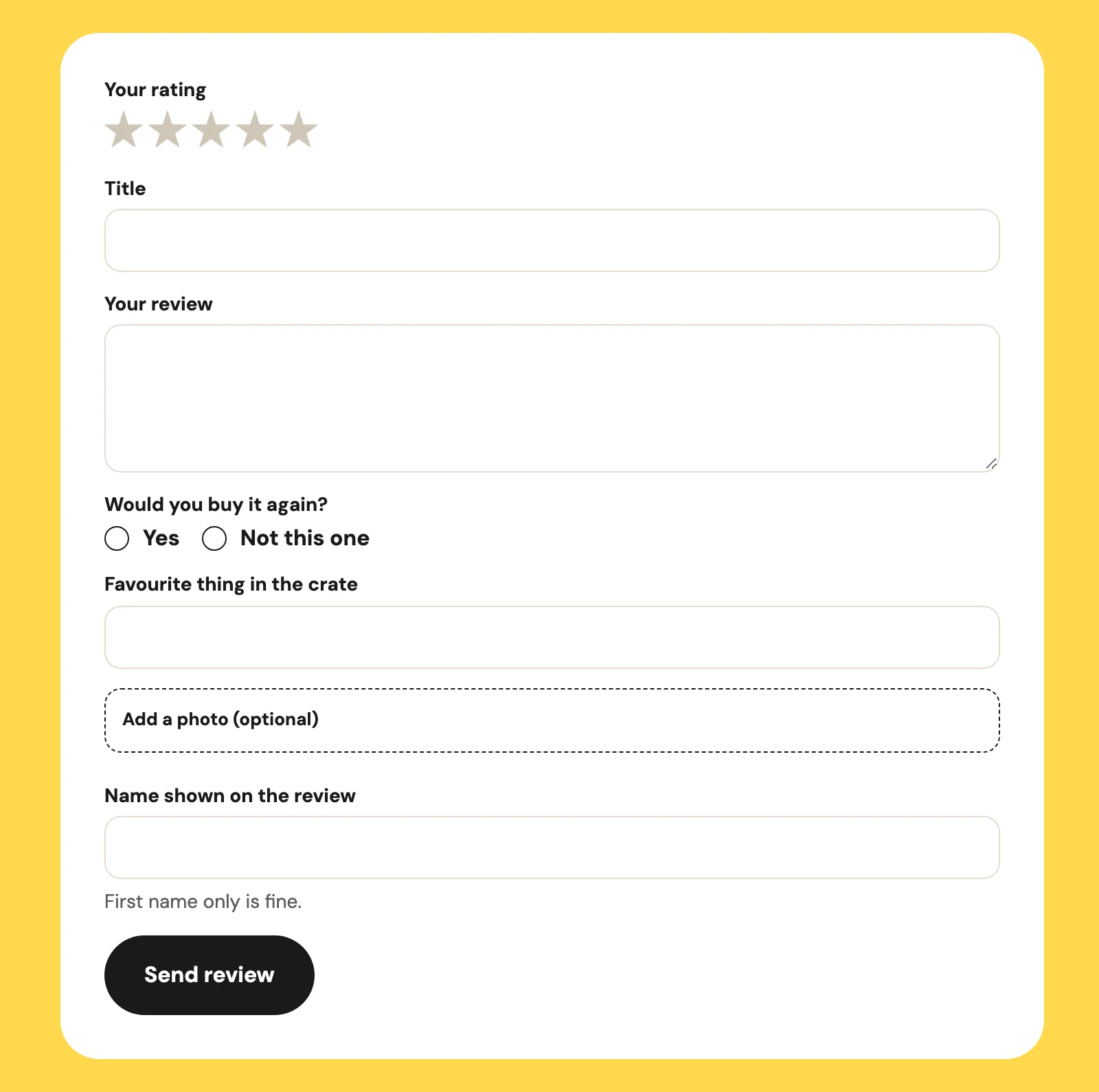
3. Shopify keeps the review, as a draft. data-draft="true" is the moderator. Each review arrives under Content › Metaobjects as a draft and stays off the site until someone makes it active. Without it, every review goes live the moment it is sent, the first offensive one included. It works only when the definition has Active-draft status.
4. Flow reacts. Two workflows do the rest. The first starts on Metaobject entry created for the review definition and emails you: a review is waiting. The second starts when an order is fulfilled, waits a few days, and sends the customer a link to leave a review on your site. Both are in the Flow library, ready to import: Review moderation notice and Review request after delivery. They are written for a definition with rating, body, author, product and photo: after importing, check that the email step reads the keys your own form sends.


5. You approve. In Shopify, you read the review and make it active. That is the only step a person does.
6. Smootify reads back. A smootify-metaobjects element lists the active reviews, six at a time, with buttons for the next and previous page:
metaobject="rating" sets the CSS variable --metafield-rating, the rating as a share of its scale (80% for 4 out of 5): give the row of stars inside it that width, and the stars fill.

That is a review system: collected on your site, kept in your store, moderated by you, shown with your design.
The same thing, nine more times
Change the fields and the workflow, and the same loop becomes another app you no longer rent:
| What | The form collects | Flow does |
|---|---|---|
| Back in stock | an email and the variant | emails the customer when the variant is back |
| Waitlist | an email and the product | emails the waitlist when the product gets its first stock |
| Price drop | an email and the variant | checks the price every day, and emails who now pays less |
| Warranty registration | serial number, purchase date, receipt | tags the customer, and reminds them before the warranty ends |
| Reseller application | company, VAT number, volumes | notifies your sales team |
| Event registration | name, date, notes | notifies you of each registration |
| Defect report | order, reason, photo | notifies your support |
| Custom quote | measures, materials, a drawing | notifies you with the request |
| Feedback | a score and a comment | tags the unhappy customers, for a follow-up |
The alerts share one definition, with a field for the kind of alert:
Back in stock
- Starts when
- The variant goes from zero to one or more in stock.
- Then
- It emails the customers tagged for that variant and removes the tag.
- Workflow
- Back in stock in the Flow library
Price drop
- Starts when
- A daily check finds the variant cheaper than when the customer asked.
- Then
- It emails the customer and marks the alert as sent.
- Workflow
- Price drop in the Flow library
Waitlist
- Starts when
- The product, published with no stock, gets its first stock.
- Then
- It emails the customers tagged for that product and removes the tag.
- Workflow
- Waitlist in the Flow library
With customer-field on the form, an entry is also linked to the logged-in customer. Smootify’s server writes the customer itself, so a page cannot fake it, and a workflow can tag them or update their metafields. New in 2.0, metaobject-editor lets that customer open their own entry again, change it or delete it: a warranty registration with the wrong serial number, a gift list that needs one more item.
Where people get stuck
Most failures here are quiet, so check these first:
- The form disappears on the live site. The Server plan or Metaobject creator is missing, or the page is not on the licensed domain: Smootify removes the element without a word.
- A review goes live without approval. The definition has no Active-draft status, so
data-draftis ignored. - Entries are saved and the site never shows them. The definition has no Storefronts access, or the entries are still drafts waiting for you in Shopify.
- The photo is missing from the entry. The
nameoffile-inputis not the key of the file field. - Nothing is saved. A field’s Name is not a key, and Shopify refuses the whole entry. The Error message names the field, so give it room to show its text. Webflow renames fields when you copy a form: check every Name after pasting.
- Nothing happens next. Shopify Flow is a separate app: free, but it has to be installed, and the workflow turned on.
Set it up with Collect data with forms, and show the entries with Show metaobjects.