Open a product page of a Webflow store that sells through Shopify and look at it the way Google does. In Smootify 1.x, Google found a Webflow page whose price and stock were written by JavaScript after the page loaded, and no product markup at all. If you wanted Google to know it was a product, with a price and an availability, you wrote the structured data by hand in the template’s custom code, from CMS fields: one currency, and only what the CMS knew. A screen reader on the same page heard three swatches as “button, button, button”: which one was chosen existed only as a class.
In 2.0 the same page, with no attribute added, tells Google what it sells and tells a screen reader what is chosen. The catch is that nothing on the page looks different. So this post reads what you cannot see: the structured data the live page writes, and what its accessibility tree, the part of the page a screen reader reads, says about the swatches. The example is Desk No. 3 on Millimetro, our furniture demo store, read on 21 October 2026.
The structured data comes from Shopify
On a product page, Smootify adds the product’s structured data (JSON-LD) to the page head. It is built from Shopify, not from the CMS, in the shape of Shopify’s own structured_data Liquid filter:
- Desk No. 3 has three variants of its Top option (Laminate, Oak, Walnut), so it is a
ProductGroupwith oneProductper variant. Each has its SKU, its price in the currency of the visitor’s market (380, 500 and 560 euros), its availability and its own link with?variant=. - Stool 01 has one variant, so it is a single
Product, at 240 euros. - Availability is
InStock,BackOrderwhen a variant sells without stock, orOutOfStock. Table Lunga in Walnut has no stock left, and its entry saysOutOfStock, while its Laminate and Oak tops sayInStock. The page never promises Google what the store has not got. - Images are the product’s media in Shopify. A product with no media in Shopify has no image, whatever the CMS holds.
- GTIN comes from the barcode only when it is a valid GTIN. An internal code in the barcode field is left out, silently. Desk No. 3 has no barcode, so it has no GTIN.
- The brand is the vendor, here Millimetro.
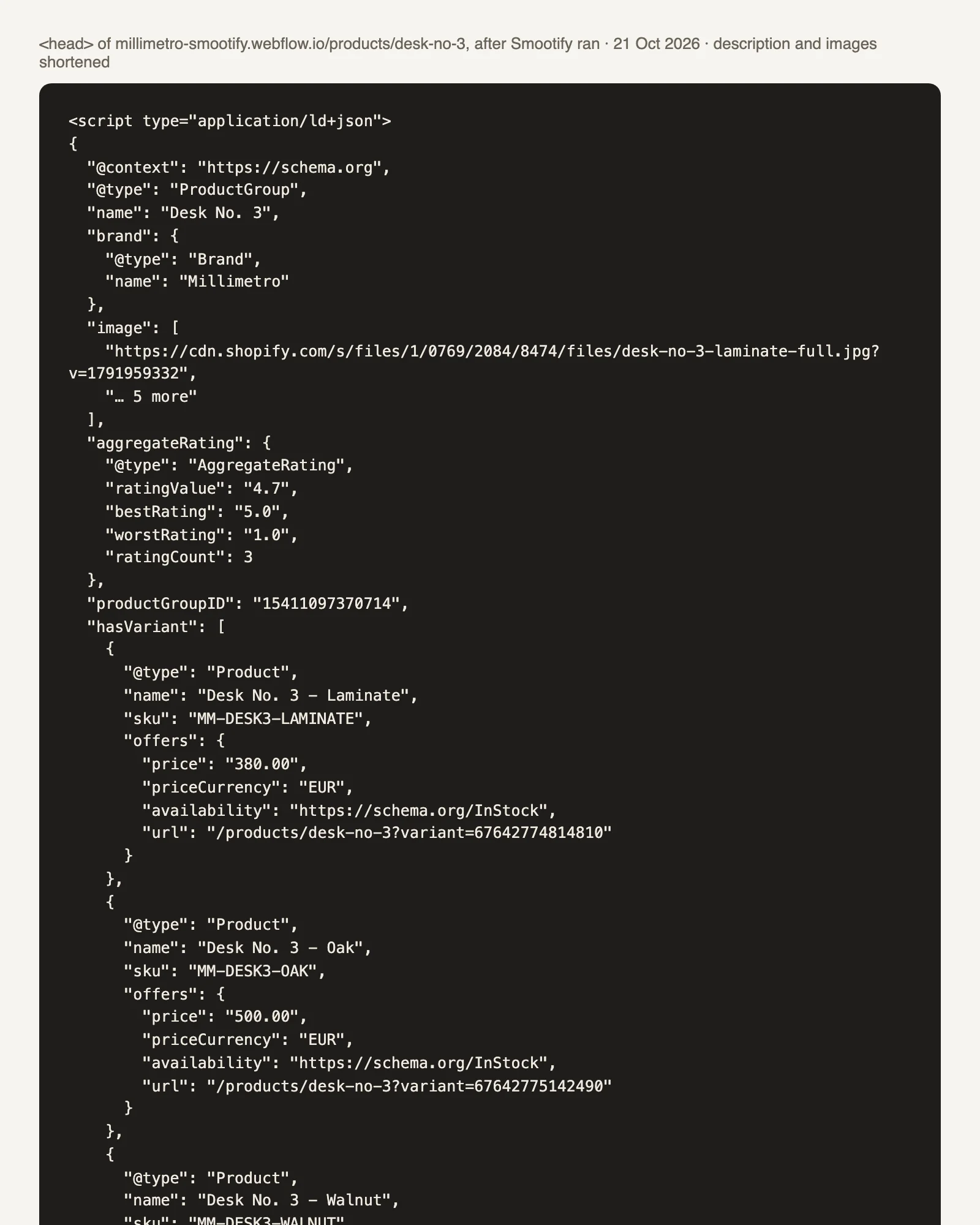
When the visitor changes market, prices and currency are written again. (On Millimetro the three markets, Italy, Switzerland and Austria, are all in euros, so you will not see a currency change there.) The guide also lists the option names Google knows, such as Color, Size, Material and Pattern, in five languages; Millimetro’s option is called Top, which is none of them, so its group carries no variesBy.
If the page already has Product markup, from an SEO app or old custom code in the template, Smootify adds nothing. To turn it off entirely, set structuredData: false in SmootifyUserOptions.
The stars, when the page shows them
Desk No. 3 shows its rating: 4.7 from 3 reviews, from Shopify’s standard metafields reviews.rating and reviews.rating_count. Smootify adds the rating to the structured data only when the page shows both, with metafield="rating" and metafield="rating_count", each with namespace="reviews", inside smootify-product. Google wants a marked-up rating to be visible, so that is the rule. How to collect the reviews themselves without a review app is in our earlier post, Reviews are not an app.

Four limits, said plainly
- On Webflow, it is not in the page source. JavaScript adds it after the page loads, so “view source” does not show it. Check with Google’s Rich Results Test, the URL inspection in Search Console, or the Elements panel of DevTools. On a store built in Astro, the structured data is written into the HTML the server sends: Millimetro’s Astro version has it in the page source, with a
BreadcrumbListnext to the product. See SEO for Astro. - It is not Google Shopping. For Shopping, Google reads script-added markup less often. The product feed of Shopify’s Google & YouTube app stays the reference there. And Google decides whether a rich result shows.
- The price is the variant’s. The configurator price of Desk No. 3, calculated from the size, and the amount a customer picks for the Gift card do not appear. Google sees the variant’s price.
- Only product pages. The URL must be under your products folder (
products, or the value ofproductsBase), and its last part must be the Shopify handle. A Webflow slug that differs from the handle means no structured data, with no warning.
What a screen reader hears
Smootify already marked states with classes. In 2.0 it writes the matching attributes next to them:
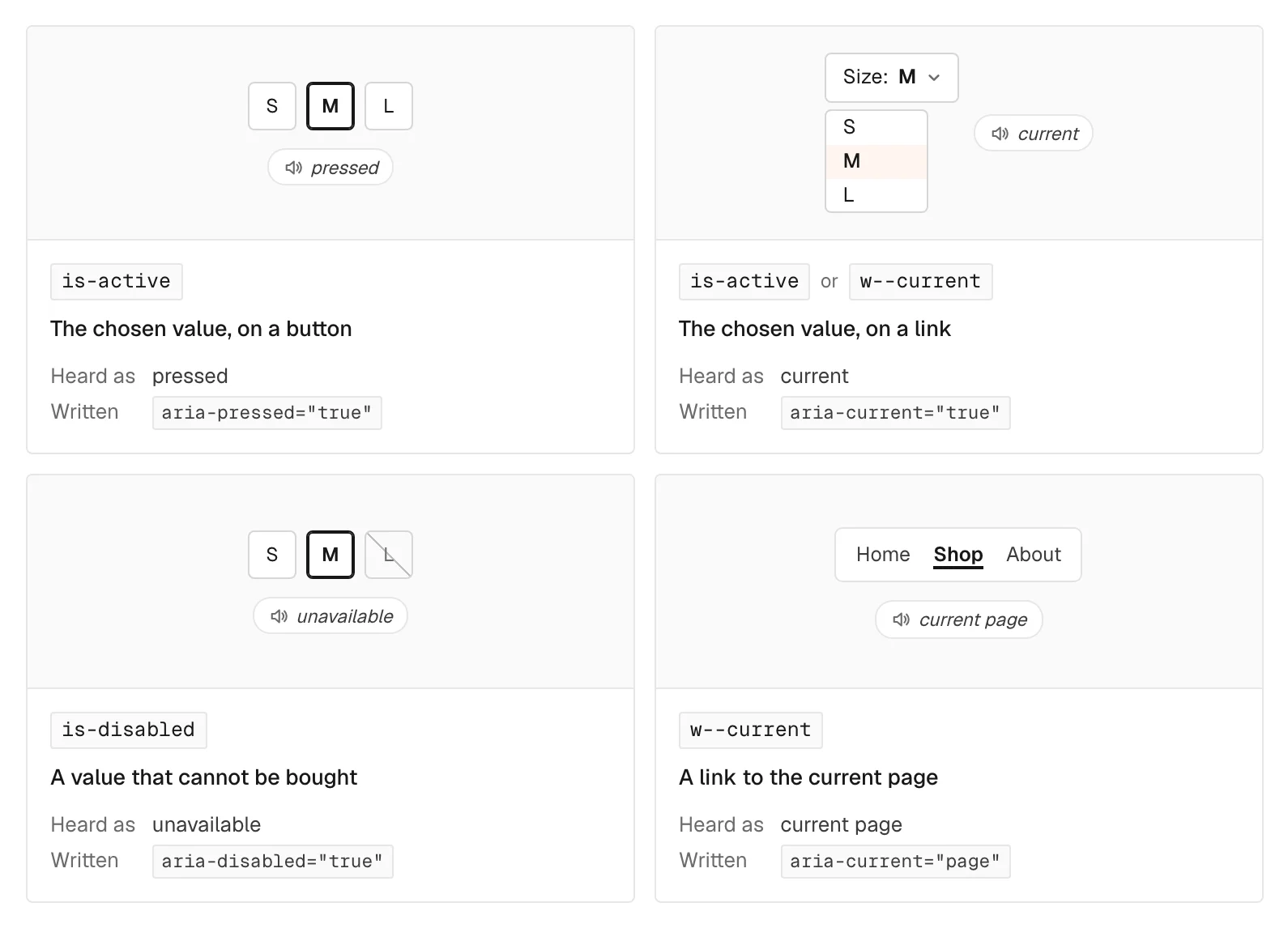
- the chosen swatch gets
aria-pressed="true"(on a button) oraria-current="true"(on a link), next tois-active; - a value that cannot be bought, such as Walnut on Table Lunga, gets
aria-disabled="true"next tois-disabled, and stays clickable, because a sold-out variant can still be chosen; - a swatch with no text of its own, only a colour or an image, gets an
aria-labelwith the value’s name; - the swatches of an option are read as a group named after the option;
- the Error message of a form is announced as soon as it shows;
- a product link to the current page gets
aria-current="page", as Webflow’s own links do.
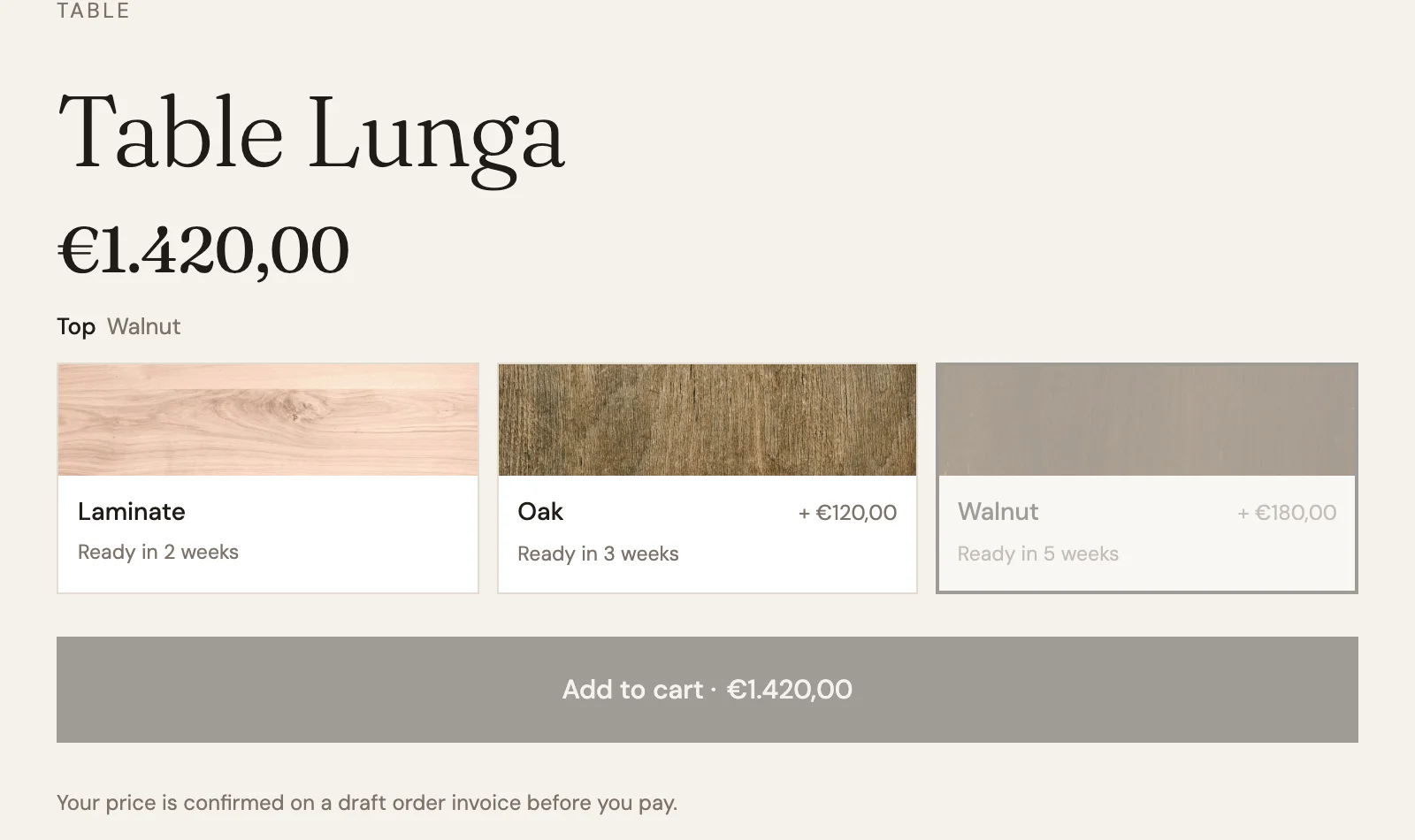
On Table Lunga, the browser’s accessibility tree reads the Top swatches as a group called “Top”: Laminate is pressed, Oak is a plain button, and Walnut is disabled. Each swatch has visible text, the wood, the price difference and the lead time, so it is named by that text and needs no aria-label. Choose Walnut anyway and it is selected: the price moves to €1.420,00 and the Add to cart button turns grey.
Because they are attributes, you can also style with them. A border on [aria-pressed="true"] and the announcement can never disagree. One catch: on a link, the attribute is aria-current, not aria-pressed, so a style written for buttons does nothing on a dropdown of links.
Smootify writes the states. It does not make a site accessible on its own: real buttons, labels for fields, names for icon buttons, contrast and focus styles stay with the design.
There is nothing to turn on: it is on every product page already. The details are in two guides: SEO and structured data and Accessibility.